Smart locks have revolutionized how we secure our homes and offices, offering unparalleled convenience and enhanced security. Among these innovations, fingerprint recognition stands out as a favored method for quick, keyless entry. Imagine effortlessly unlocking your door with just a touch, leaving traditional keys and fumbling behind. This cutting-edge technology simplifies daily routines and bolsters peace of mind. But what happens when your reliable fingerprint lock suddenly refuses to recognize your touch? It can be frustrating when your trusted biometric access system fails, leaving you wondering about the cause. This guide will delve into the common reasons why your fingerprint lock might not be recognizing your finger and provide actionable troubleshooting steps to get it working seamlessly again.
What Are Smart Locks?
Smart locks represent a significant leap forward from conventional locking mechanisms, integrating advanced technology to offer a range of intelligent access solutions. At their core, smart locks are electromechanical devices designed to perform locking and unlocking operations on a door when they receive instructions from an authorized device using a wireless protocol and a cryptographic key. They are typically part of a broader smart home ecosystem, allowing for remote control, monitoring, and integration with other smart devices. The types vary widely, from those controlled via Bluetooth or Wi-Fi to sophisticated models incorporating biometric technologies like fingerprint and facial recognition, alongside traditional methods like keypads and RFID cards. The evolution of smart locks has seen them transform from simple remote-controlled devices to highly secure, interconnected systems that offer a blend of convenience and robust protection.
The Undeniable Advantages of Smart Locks
The adoption of smart locks brings a wealth of benefits that significantly enhance both daily convenience and overall security. The most immediate advantage is the unparalleled ease of use; say goodbye to lost keys and fumbling at the door. You can unlock your home using a fingerprint, a numerical code, a smartphone app, or even voice commands, simplifying entry for residents and granting temporary access to guests or service providers remotely.
Enhanced security is another cornerstone of smart lock technology. Features like encrypted data transmission, intrusion alerts, and comprehensive activity logs provide an extra layer of protection, giving you real-time insights into who enters and exits your property. Many smart locks can detect tampering and notify you instantly on your smartphone, transforming your door into an active guardian.
Beyond security, smart locks boast impressive intelligent features. They integrate seamlessly with smart home systems, allowing for automated routines, such as turning on lights when the door unlocks. Their modern and often sleek designs also contribute to the aesthetic appeal of any home or office, making them a functional and stylish upgrade.
“A smart lock is more than just a key replacement; it’s an intelligent security solution that adapts to your lifestyle, offering convenience, control, and constant peace of mind.”
Popular Types of Smart Locks on the Market
The smart lock market offers a diverse array of options, each with unique technologies and applications. Understanding these differences helps in choosing the best fit for specific security needs and preferences.
- Fingerprint Locks: These biometric locks use optical or capacitive sensors to scan and verify unique fingerprint patterns.
- Advantages: Exceptional convenience, no keys or codes to remember, highly personal security.
- Disadvantages: Can be affected by dirty or wet fingers, sensor damage, or environmental factors.
- Prominent Brands: Samsung, Yale, Philips, August (with biometric add-ons).
- Key Card Locks: Utilizing RFID or NFC technology, these locks grant access when a programmed card is swiped or tapped against the reader.
- Advantages: Easy to issue and revoke access for multiple users, ideal for commercial or hospitality settings.
- Disadvantages: Cards can be lost or stolen.
- Applications: Offices, hotels, gyms.
- Keypad Locks: These locks require users to enter a specific numerical code on a touchscreen or physical keypad.
- Advantages: Simple to use, codes can be changed easily, no physical keys required.
- Disadvantages: Codes can be forgotten, shared, or observed.
- Advanced Features: Scrambling codes, temporary codes.
- Facial Recognition Locks: Employing advanced camera technology and AI, these locks identify users by their unique facial features.
- Advantages: Highly secure and hands-free, cutting-edge technology.
- Disadvantages: Higher cost, performance can be affected by lighting conditions, privacy concerns.
- Advanced Technology: Often used in high-security or luxury residential settings.
- Smartphone-Controlled Locks (Bluetooth/Wi-Fi): These locks pair with a smartphone app, allowing users to unlock doors remotely via Bluetooth for proximity access or Wi-Fi for access from anywhere in the world.
- Advantages: Remote access management, activity logs, integration with smart home ecosystems.
- Disadvantages: Relies on smartphone battery and network connectivity.
- Integration: Often combined with other methods like keypads or traditional keys for backup.
Comparison Table of Smart Lock Types
| Feature | Fingerprint Lock | Key Card Lock | Keypad Lock | Facial Recognition Lock | Smartphone-Controlled Lock |
|---|---|---|---|---|---|
| Security Level | High | Medium | Medium | Very High | High |
| Convenience | Very High | Medium | High | Very High | High |
| Cost | Medium | Low-Medium | Low-Medium | High | Medium |
| Ideal For | Homes, Offices | Offices, Hotels | Homes, Rentals | High-End Homes, Security | Homes, Rental Properties |
| Keyless Entry | Yes | Yes | Yes | Yes | Yes |
| Remote Access | Varies | No | No | Varies | Yes |
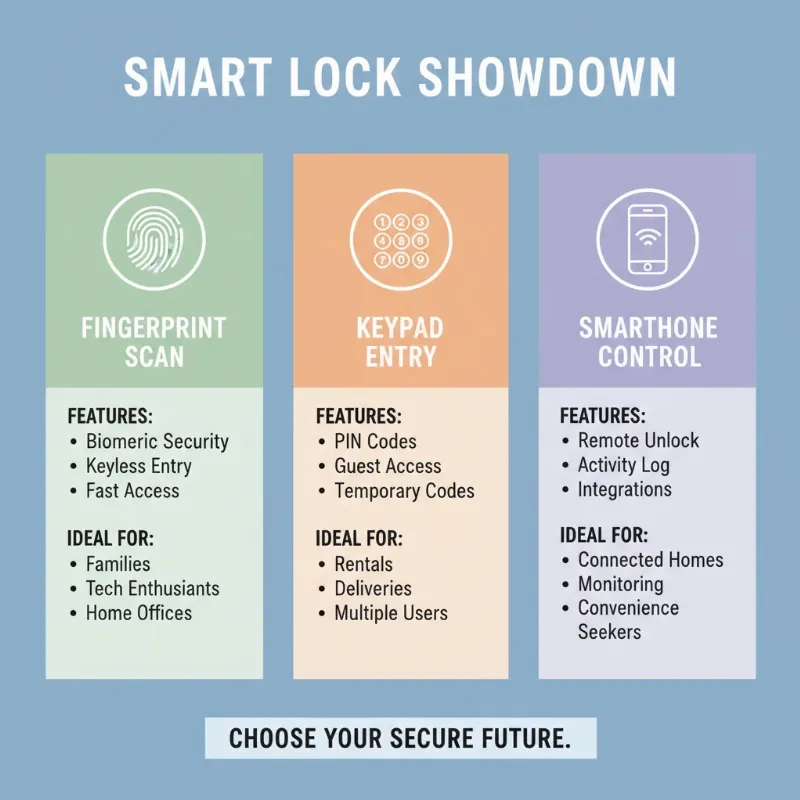 A comparison chart illustrating different types of smart locks and their features for informed decision-making
How to Choose the Right Smart Lock
Selecting the perfect smart lock involves a thoughtful evaluation of your specific needs, the type of door, your desired security level, and your budget. With a market flooded with options, a methodical approach ensures you make an informed decision.
First, determine your usage needs. Are you looking for hands-free entry for a busy family, remote access for a rental property, or robust security for a commercial establishment? Consider the type of door you have (e.g., standard, sliding, glass) as not all locks are compatible with every door. Your desired level of security and integration with existing smart home systems are also crucial factors.
Next, research reputable brands. Companies like Philips, Yale, Samsung, and Xiaomi are known for their quality and reliability in the smart lock space. Explore their product lines and read user reviews to gauge real-world performance and customer satisfaction.
Then, compare features and specifications. Look for essential functionalities like multiple unlocking methods, activity logging, anti-tamper alarms, and battery life. For fingerprint locks, assess the sensor type (optical vs. capacitive) and its recognition speed and accuracy. Always check the warranty and technical support policies, as good after-sales service is invaluable for complex devices. By considering these aspects, you can confidently select a smart lock that truly meets your needs and enhances your property’s security and convenience.
Tips for Proper Smart Lock Usage and Maintenance
Ensuring your smart lock, especially a fingerprint model, operates optimally and lasts for years requires diligent usage and regular maintenance. A little proactive care can prevent most common issues and keep your entry system reliable.
- Regular Battery Checks: For battery-powered locks, check and replace batteries periodically (e.g., every 6-12 months), even if they haven’t completely died. Low battery levels are a frequent cause of recognition failures.
- Keep it Clean: Regularly clean both the fingerprint sensor and your fingers. Use a soft, lint-free microfiber cloth to wipe the sensor, removing dust, oils, and smudges. For stubborn dirt, a slightly damp cloth with water or isopropyl alcohol (sparingly) can be used, ensuring it dries completely. Make sure your hands are clean and dry before each use, avoiding lotions or hand sanitizers right before scanning.
- Firmware and Software Updates: Always keep your smart lock’s firmware and accompanying mobile app updated. Manufacturers frequently release updates that improve security, enhance performance, and fix bugs, including those affecting fingerprint recognition.
- Secure Passcodes (if applicable): If your lock uses codes, change them periodically and avoid easily guessable sequences.
- Protect from Elements: While smart locks are often designed for outdoor use, extreme weather can take a toll. Consider a protective cover if your lock is exposed to harsh sun, rain, or snow.
- Re-register Fingerprints: If you notice a decline in recognition accuracy, try deleting and re-registering your fingerprints. Ensure you capture your finger from multiple angles and with varying pressure during enrollment for comprehensive data.
- Avoid Physical Damage: Be mindful of not scratching or damaging the fingerprint sensor. Use the lock as intended, and if you have a screen protector over an in-display sensor, ensure it’s compatible and not interfering.
- Professional Servicing: If you encounter persistent issues, don’t hesitate to contact the manufacturer’s customer support. They can provide advanced troubleshooting or recommend professional servicing.
By following these simple tips, you can extend the lifespan of your smart lock and ensure a consistently smooth and secure entry experience.
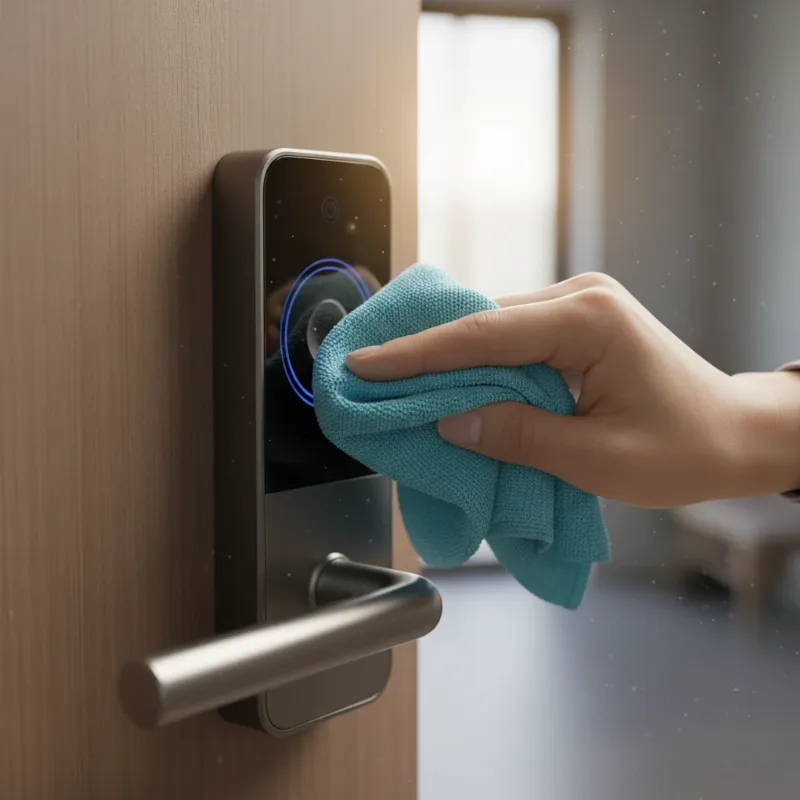 A close-up shot of a hand gently cleaning a smart lock's fingerprint sensor with a microfiber cloth to highlight maintenance.
Common Problems When Using Smart Locks and How to Fix Them
Even with the most advanced technology, fingerprint locks can encounter issues that prevent them from recognizing your touch. Understanding these common problems and their solutions is key to quickly restoring seamless access.
Why Your Fingerprint Lock Won’t Recognize Your Finger: The Core Issues
When your fingerprint lock repeatedly fails to grant access, several factors could be at play, ranging from environmental to technical.
- Dirty Fingers or Sensor: This is arguably the most common culprit. Oils, dirt, sweat, lotions, or even residue from food on your finger or the sensor can obscure your unique print, making it impossible for the scanner to read it accurately.
- Solution: Always ensure both your finger and the sensor are clean and dry. Use a soft, lint-free cloth to gently wipe the sensor. If your hands are prone to dryness or cracking, a light application of hand lotion (and allowing it to absorb fully) before scanning might help improve recognition.
- Improper Finger Placement: During the initial enrollment, if your finger wasn’t placed consistently or covered the sensor fully, the lock might struggle to recognize it later. Similarly, if you place your finger too lightly, too hard, or at a strange angle, it can cause issues.
- Solution: Re-register your fingerprints. When doing so, scan your finger from multiple angles and apply the same firm, consistent pressure you would use during daily unlocking. Cover as much of the sensor as possible during enrollment.
- Scars, Cuts, or Changes in Fingerprint: Life happens, and our fingerprints can change due to cuts, scars, extreme dryness, or even temporary swelling. These alterations can make your print unrecognizable to the sensor.
- Solution: If your finger has sustained a significant change, delete the old fingerprint data and re-enroll the affected finger. Consider enrolling multiple fingers or alternate fingers as backups.
- Low Battery: Smart locks, especially those with fingerprint sensors, require adequate power. A low battery can lead to sluggish performance or complete failure in recognizing fingerprints.
- Solution: Replace the batteries immediately with fresh, high-quality ones. If your lock has a rechargeable battery, ensure it’s fully charged.
- Software or Firmware Glitches: Like any electronic device, smart locks can experience temporary software bugs or have outdated firmware that affects performance.
- Solution: A simple restart of the lock can often clear minor glitches. Consult your lock’s manual for restart procedures (often a small reset button). Check the manufacturer’s app for any available firmware updates and install them.
- Environmental Factors: Extreme temperatures or humidity can sometimes affect sensor performance. Very cold temperatures can make fingers dry and stiff, while hot, humid weather can lead to sweaty fingers.
- Solution: Be aware of these conditions. Ensure your hands are at a comfortable temperature and dry before scanning. If the sensor itself feels unusually hot or cold, let it return to a normal operating temperature if possible.
- Hardware Obstructions or Damage: A screen protector that’s incompatible or improperly installed (for in-display sensors), or physical damage like scratches on the sensor itself, can impede accurate scanning.
- Solution: Inspect the sensor for any visible damage. If you use a screen protector, try removing it temporarily to see if recognition improves. If there are visible scratches, the sensor might need repair or replacement. For smart door locks, ensure internal cable connectors are fully inserted and undamaged.
- Poor Initial Enrollment: If the initial fingerprint registration process was rushed or not done thoroughly, the lock might not have a complete or clear image of your fingerprint to match against.
- Solution: Delete existing fingerprints and re-register them with utmost care, following the on-screen prompts closely and ensuring full coverage and various angles of your finger are captured.
|
Our Picks for the Best smart locks in 2026
As an Amazon Associate I earn from qualifying purchases.
|
||
| Num | Product | Action |
|---|---|---|
| 1 | Smart Door Lock with Camera Fingerprint Keyless Entry Door Lock Electronic Deadbolt with Keypad Code, App Remote Control, Auto Unlock for Front Door |

|
| 2 | Yale Security Assure Lock 2 Deadbolt, Black Suede Keyed Smart Entry Door Lock with Wi-Fi Connected Keypad for Code Entry and Remote Access, YRD410-WF1-BSP |
|
| 3 | Smart Door Handle Lock with Keypad: Yamiry Fingerprint Smart Knob - Keyless Entry Digital Lock for Front Door - Deadbolt with APP - Generate Passcode Remotely - DIY Installation |
|
| 4 | Schlage Encode Smart WiFi Deadbolt Lock for Front Door - Keyless Entry with App or Touchscreen - Works with Alexa, Hey Google, & Airbnb - Create Codes for Guests - Satin Nickel Silver |
|
| 5 | Schlage Encode Smart WiFi Deadbolt Lock for Front Door - Keyless Entry with App or Touchscreen - Works with Alexa, Hey Google, & Airbnb - Create Codes for Guests - Matte Black |
|
| 6 | Wyze Auto-Lock Bolt v2, Fingerprint Keyless Entry Smart Lock, AI Learning Scanner with Wi-Fi Front Door Lock Deadbolt, Auto-Lock, 8 Months Battery, BHMA2, IP53, Anti-Peep Keypad, Backup Keys |
|
| 7 | Tapo Smart Wi-Fi Deadbolt Door Lock – Keyless Tactile Buttons, Customized Access with in-App Monitoring, Auto-Lock, IP54 Weatherproof, BHMA Grade 3, Compatible with Standard Door Sizes, Tapo DL100 |
|
| 8 | TEEHO TE001 Keyless Entry Door Lock with Keypad - Smart Deadbolt Lock for Front Door with 2 Keys - Auto Lock - Easy Installation - Matte Black |
|
| 9 | Wyze Palm Lock, Smart Door Lock with Palm Vein Recognition, Keyless Entry Smart Locks for Front Door, Keypad, Auto Lock, Dual Battery, Wi-Fi, Works with Alexa & Google, BHMA, IP53, Mechanical Key |
|
| 10 | ULTRALOQ U-Bolt Pro WiFi Smart Lock with Door Sensor, 8-in-1 Keyless Entry Door Lock with Fingerprint ID, App Remote Control, Built-in WiFi Keypad Deadbolt, Auto Unlock, IP65 Waterproof, Easy Install |
|
By systematically addressing these potential issues, you can troubleshoot and resolve most fingerprint recognition problems, restoring the convenience and security of your smart lock.
Future Trends in Smart Locks
The landscape of smart lock technology is continuously evolving, driven by advancements in artificial intelligence, enhanced connectivity, and a growing emphasis on integrated home ecosystems. The future promises even more sophisticated and seamless security solutions.
One significant trend is the deeper integration of Artificial Intelligence (AI). AI will enable locks to “learn” user habits, recognize subtle changes in fingerprints due to age or minor injuries, and even anticipate access needs. This predictive capability could lead to faster, more reliable recognition and proactive security alerts. For instance, AI could differentiate between a legitimate user’s slightly altered fingerprint and an unauthorized attempt.
Enhanced connectivity will see smart locks becoming even more integral to the smart home. Expect tighter integration with other smart devices, enabling complex automation scenarios. Imagine your door unlocking as your car pulls into the driveway, lights turning on, and your favorite music starting, all seamlessly orchestrated by your smart home hub. This includes wider adoption of standards like Matter for universal compatibility.
The use of blockchain technology is also emerging as a potential game-changer for bolstering security. Blockchain could create immutable, decentralized records of access, significantly increasing transparency and making it virtually impossible for unauthorized access logs to be tampered with. This would add an unprecedented layer of trustworthiness to smart lock systems.
Furthermore, expect the development of novel unlocking methods. While fingerprint and facial recognition are highly advanced, future innovations might include voice recognition with advanced anti-spoofing, gesture-based unlocking, or even more refined physiological biometrics. These advancements aim to make access not just secure, but truly intuitive and effortless. The future of smart locks is bright, promising a blend of cutting-edge security, hyper-personalization, and unparalleled convenience.
Conclusion
Smart locks, particularly those featuring fingerprint recognition, offer an exceptional blend of modern convenience and robust security for our homes and workplaces. While the occasional hiccup in recognition can be frustrating, most issues are easily resolved with a few simple troubleshooting steps. From ensuring clean fingers and sensors to keeping firmware updated and re-registering prints, maintaining your smart lock’s performance is largely within your control. Embracing these smart security solutions not only simplifies your daily life but also significantly enhances the overall safety and accessibility of your property. Don’t let a minor glitch deter you from the incredible benefits these technologies provide.
Are you ready to unlock the full potential of smart security for your home or business? Visit SmartLocksPro.com today to explore our extensive range of cutting-edge smart lock products and find the perfect solution tailored to your needs.
Frequently Asked Questions
Is a fingerprint lock more secure than a traditional lock?
Yes, a fingerprint lock generally offers superior security compared to a traditional mechanical lock. Unlike physical keys which can be lost, stolen, or duplicated, fingerprints are unique to each individual and much harder to forge. They also provide an audit trail of who accessed your property and when, enhancing accountability and security oversight. Modern fingerprint locks often include advanced encryption and anti-tamper features, further increasing their resilience against unauthorized entry.