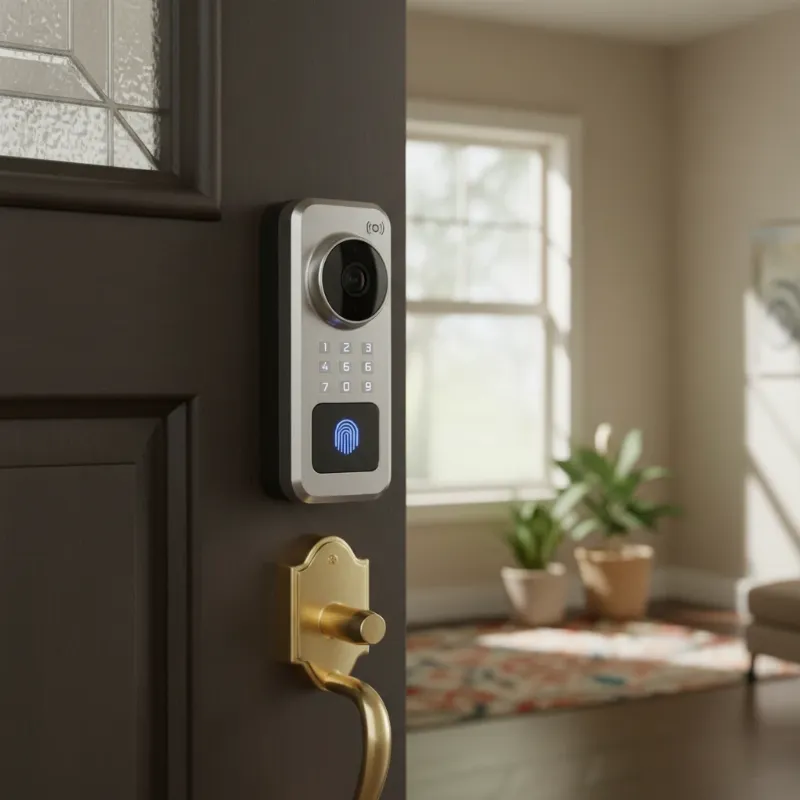
Smart locks have revolutionized home security, offering unparalleled convenience and control right from your fingertips. Yet, the seamless experience these devices provide can quickly be disrupted by one common issue: rapid battery drain. If you find yourself frequently replacing your smart lock’s batteries, you’re not alone. This guide delves into the primary reasons why your smart lock might be consuming power faster than expected and provides actionable solutions to extend its battery life, ensuring your home remains secure and convenient without constant upkeep.
What is a Smart Lock and How Does It Use Power?
A smart lock is an electromechanical device that secures a door, operating on commands from an authorized user using a control mechanism other than a traditional physical key. These devices leverage various technologies like Bluetooth, Wi-Fi, Z-Wave, Zigbee, or even cellular data to communicate with your smartphone or a smart home hub. Each interaction, from unlocking the door to sending notifications and maintaining network connectivity, requires power. The internal motor that engages the deadbolt, the illuminated keypad, and especially the wireless communication modules are the primary consumers of battery energy. Locks that rely on Wi-Fi for constant cloud connection, for instance, typically draw more power than those using low-energy protocols like Bluetooth or Z-Wave, which usually communicate with a nearby hub.
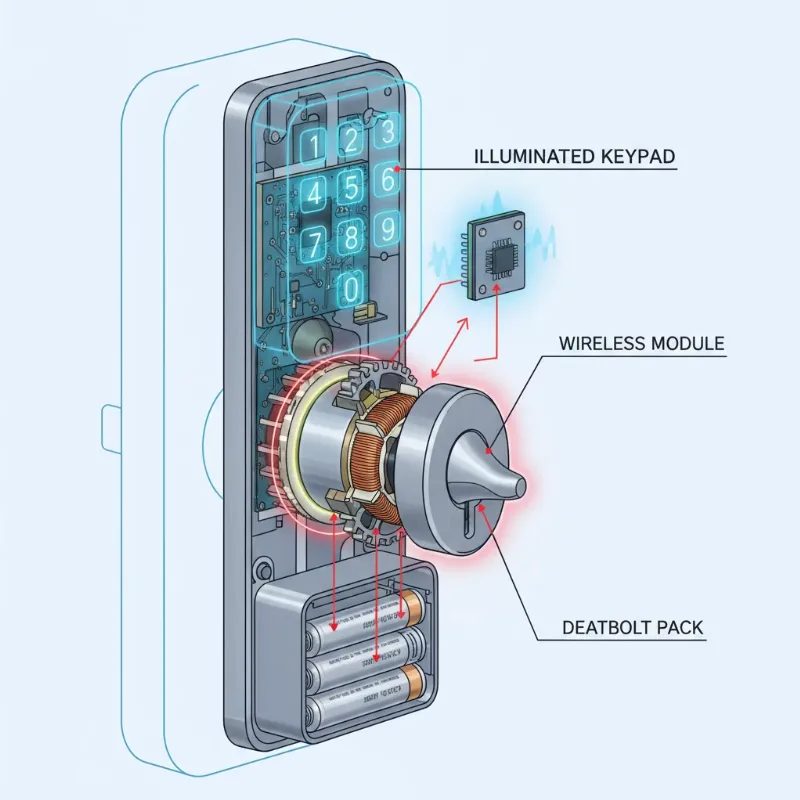 Illustration of smart lock internal components consuming power, showing motor, keypad, and wireless module.
Common Causes of Smart Lock Battery Drain
Understanding why your smart lock’s battery is depleting rapidly is the first step toward a lasting solution. Several factors, often overlooked, can significantly impact battery longevity.
Frequent Usage: It might seem obvious, but the more often your smart lock is activated—whether through manual turns, keypad entries, or app commands—the faster its batteries will drain. Each lock and unlock cycle engages the internal motor, a major power consumer.
Poor Wi-Fi/Bluetooth Signal Strength: When your smart lock struggles to connect to your home network or smart hub, its wireless module works overtime, constantly searching for and attempting to maintain a stable connection. This persistent effort can be a significant drain on battery life, especially for Wi-Fi-enabled locks.
Extreme Temperatures: Smart locks are often installed on exterior doors, exposing them to varying weather conditions. Both exceptionally cold and intensely hot temperatures can negatively impact battery performance, reducing their efficiency and overall lifespan. Cold weather, in particular, can drastically shorten battery life.
Misaligned Door or Deadbolt: This is one of the most common and often underestimated culprits. If the deadbolt encounters resistance when extending into or retracting from the strike plate, the lock’s motor has to exert more force. This increased strain forces the motor to work harder, consuming much more battery power with each operation.
Faulty Batteries or Incorrect Battery Type: Not all batteries are created equal. Using low-quality, generic batteries or an incorrect type (such as rechargeable batteries if your manufacturer recommends non-rechargeable alkaline) can lead to premature drain. Mixing old and new batteries is also detrimental, as older batteries can drain the charge from newer ones.
Outdated Firmware: Manufacturers frequently release firmware updates to improve performance, enhance security, and optimize power management. Running an outdated firmware version might mean your lock isn’t operating with the most efficient power consumption algorithms.
Excessive Features Enabled: Many smart locks come packed with convenient features like auto-lock, constant monitoring, motion detection, and frequent push notifications. While useful, enabling too many of these features, or having them set to highly sensitive thresholds, can lead to continuous activity and increased battery usage.
Third-Party Integrations: Smart locks are often integrated into larger smart home ecosystems. Continuous communication with a smart home hub or other connected devices, especially if the “ping frequency” is high, can contribute to faster battery drain.
Physical Obstructions or Internal Damage: Any physical resistance within the lock mechanism, such as dirt, debris, or a loose internal wire, can force the motor to work harder. Corrosion on battery terminals can also prevent the lock from accurately detecting battery levels and impact overall efficiency.
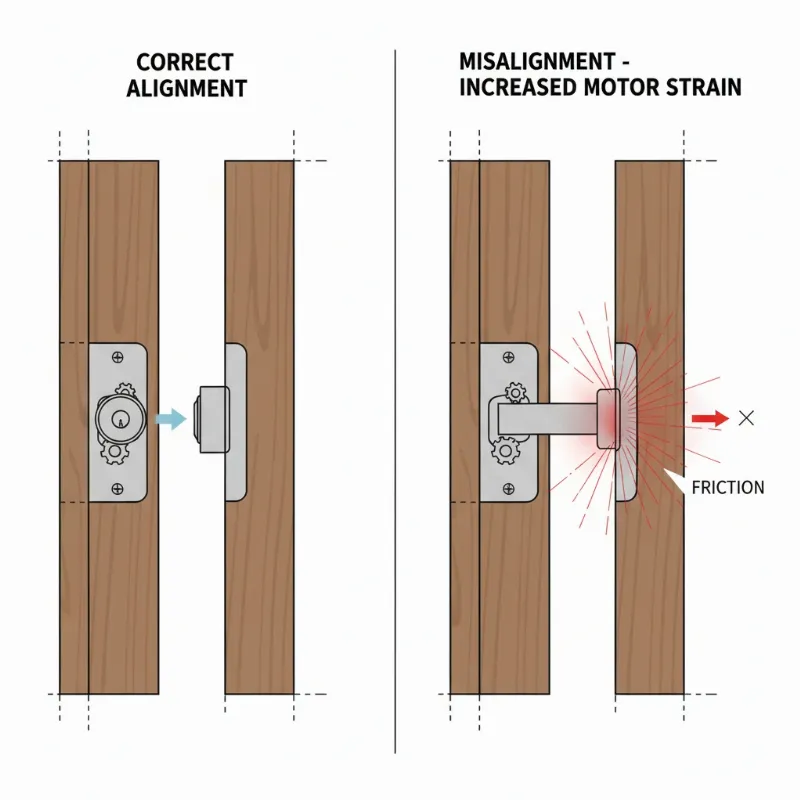 A diagram showing a misaligned door frame and strike plate causing resistance for a smart lock deadbolt.
Types of Smart Lock Batteries and Their Lifespan
Smart locks typically use standard, readily available batteries, but the type can influence performance and longevity.
- AA and AAA Alkaline Batteries: These are the most common choice, widely available and affordable. Under normal use, they typically provide 6 to 12 months of battery life. However, heavy usage can reduce this to 3-6 months.
- CR123A Lithium Batteries: Often found in more advanced or compact smart locks, lithium batteries offer a longer lifespan and better performance in extreme temperatures. They can last 9 to 18 months under standard use.
- Proprietary Battery Packs: Some high-end or specialized smart locks use custom-designed rechargeable lithium-ion battery packs. Their lifespan varies greatly by model and usage, often providing several months before needing a recharge.
It’s crucial to consult your smart lock’s manual for the manufacturer’s recommended battery type and brand. High-quality, name-brand batteries are always a better investment for consistent performance and longer life.
Troubleshooting Steps for Rapid Battery Drain
When your smart lock’s battery drains too quickly, a systematic approach to troubleshooting can often pinpoint and resolve the issue.
- Check Battery Type and Quality: Ensure you are using the exact battery type and size recommended by the manufacturer. Opt for reputable, non-rechargeable alkaline or lithium batteries, and avoid mixing old and new batteries.
- Inspect Door Alignment: Manually lock and unlock your door to feel for any resistance. If the deadbolt rubs against the strike plate or door frame, adjust the strike plate or hinges to ensure a smooth, effortless operation. A properly aligned door significantly reduces the motor’s workload.
- Update Firmware: Regularly check your smart lock’s companion app for available firmware updates. These updates often include crucial bug fixes and power efficiency improvements that can extend battery life. Always install new batteries after a significant firmware update.
- Optimize Connectivity: A weak wireless signal forces your lock to consume more power.
- Wi-Fi Locks: Try moving your Wi-Fi router closer to the door, or consider a Wi-Fi extender or a dedicated bridge if your lock supports it, to strengthen the signal.
- Z-Wave/Zigbee Locks: Ensure your smart home hub has a strong mesh network, with enough repeaters to provide a clear path to the lock.
- Adjust Settings: Review your smart lock’s settings in its mobile app.
- Disable unnecessary features like excessive notifications, “lock sounds,” or LED status lights.
- Adjust the auto-lock delay to a longer interval if immediate locking isn’t critical for your security needs.
- If applicable, modify the “heartbeat interval” (how often the lock checks in with its hub) to a longer duration.
- Monitor Usage Patterns: If the lock is in a high-traffic area, understand that more frequent usage naturally leads to faster battery drain. Consider if there are ways to reduce unnecessary activations.
- Consider Environmental Factors: If your lock is exposed to direct sunlight or extreme cold, explore weatherproofing accessories like touchscreen covers or sealants, or consider repositioning to a more sheltered location if feasible.
- Clean Battery Compartment and Terminals: Dust, dirt, or minor corrosion on the battery contacts can impede power flow. Gently clean the terminals with a dry cloth or a cotton swab.
- Factory Reset (Last Resort): If all else fails, performing a factory reset and re-pairing your smart lock can sometimes resolve underlying software glitches affecting battery performance. Remember to follow your manufacturer’s specific instructions, as this will typically erase all settings and access codes.
Advanced Solutions and Preventive Measures
Beyond troubleshooting, adopting preventive measures can ensure your smart lock maintains optimal battery performance over its lifespan.
- Regular Maintenance: Schedule periodic checks (every 3-6 months) to inspect the door alignment, clean the lock mechanism, and lubricate the deadbolt with dry graphite powder (avoiding oil-based lubricants). This reduces friction and motor strain.
- Smart Home Hub Optimization: If your smart lock is part of a larger smart home system, ensure the hub’s firmware is also up to date and that its communication with the lock is efficient. Excessive pinging or re-connection attempts from the hub can draw power.
- Battery Management Systems: Some advanced smart lock apps offer detailed battery health insights and optimization suggestions. Utilize these features to actively manage power consumption.
- Choosing Energy-Efficient Models: When purchasing a new smart lock, research its communication protocols and reported battery life. Locks primarily using Bluetooth Low Energy (BLE), Z-Wave, or Zigbee typically offer better battery longevity than Wi-Fi-only models due to their lower power requirements. Some models even feature integrated solar panels for supplemental charging.
- Emergency Backup Power: Many smart locks include a backup power option, such as terminals for a 9V battery or a micro-USB port for temporary power via a power bank. Familiarize yourself with these features and keep the necessary items handy to avoid being locked out.
“A smart lock is not just a convenience; it’s a critical component of your home’s security. Proactive battery maintenance ensures it performs reliably when you need it most.”
Person checking smart lock battery compartment, performing maintenance, or optimizing settings on a smartphone app.
When to Contact Support or Consider Replacement
If you’ve diligently followed all troubleshooting steps and still experience persistent, rapid battery drain, it may be time to contact the manufacturer’s technical support. The issue could stem from a faulty internal component, wiring damage, or a software bug that requires specialized assistance. Provide them with detailed information about your observations and the steps you’ve already taken.
In some cases, especially if your smart lock is older or has sustained damage, replacement might be the most practical solution. Persistent mechanical failures, irreversible internal damage, or a model consistently underperforming despite best efforts could indicate its end of serviceable life. Modern smart locks continuously improve in energy efficiency and reliability, making an upgrade a worthwhile investment for enhanced security and peace of mind.
Conclusion
A fast-draining smart lock battery can quickly turn a modern convenience into a source of frustration. However, by understanding the common causes—from misaligned doors to poor connectivity and outdated firmware—and implementing the effective solutions outlined above, you can significantly extend your smart lock’s battery life. Proactive maintenance, careful battery selection, and optimizing your device’s settings are key to ensuring consistent, reliable performance. Embrace these tips to maintain your smart lock’s efficiency, enhance your home’s security, and enjoy the true convenience of smart living without constantly worrying about power.
Is your smart lock battery life meeting your expectations? What strategies have you found most effective in extending it?
Frequently Asked Questions
Are smart lock batteries rechargeable?
|
Our Picks for the Best smart locks in 2026
As an Amazon Associate I earn from qualifying purchases.
|
||
| Num | Product | Action |
|---|---|---|
| 1 | Smart Door Lock with Camera Fingerprint Keyless Entry Door Lock Electronic Deadbolt with Keypad Code, App Remote Control, Auto Unlock for Front Door |

|
| 2 | Schlage Encode Smart WiFi Deadbolt Lock for Front Door - Keyless Entry with App or Touchscreen - Works with Alexa, Hey Google, & Airbnb - Create Codes for Guests - Satin Nickel Silver |
|
| 3 | TEEHO TE001 Keyless Entry Door Lock with Keypad - Smart Deadbolt Lock for Front Door with 2 Keys - Auto Lock - Easy Installation - Matte Black |
|
| 4 | ULTRALOQ U-Bolt Pro WiFi Smart Lock with Door Sensor, 8-in-1 Keyless Entry Door Lock with Fingerprint ID, App Remote Control, Built-in WiFi Keypad Deadbolt, Auto Unlock, IP65 Waterproof, Easy Install |
|
| 5 | Schlage Encode Smart WiFi Deadbolt Lock for Front Door - Keyless Entry with App or Touchscreen - Works with Alexa, Hey Google, & Airbnb - Create Codes for Guests - Matte Black |
|
| 6 | Wyze Palm Lock, Smart Door Lock with Palm Vein Recognition, Keyless Entry Smart Locks for Front Door, Keypad, Auto Lock, Dual Battery, Wi-Fi, Works with Alexa & Google, BHMA, IP53, Mechanical Key |
|
| 7 | Tapo Smart Wi-Fi Deadbolt Door Lock – Keyless Tactile Buttons, Customized Access with in-App Monitoring, Auto-Lock, IP54 Weatherproof, BHMA Grade 3, Compatible with Standard Door Sizes, Tapo DL100 |
|
| 8 | Yale Security Assure Lock 2 Deadbolt, Black Suede Keyed Smart Entry Door Lock with Wi-Fi Connected Keypad for Code Entry and Remote Access, YRD410-WF1-BSP |
|
| 9 | Smart Door Handle Lock with Keypad: Yamiry Fingerprint Smart Knob - Keyless Entry Digital Lock for Front Door - Deadbolt with APP - Generate Passcode Remotely - DIY Installation |
|
| 10 | Wyze Auto-Lock Bolt v2, Fingerprint Keyless Entry Smart Lock, AI Learning Scanner with Wi-Fi Front Door Lock Deadbolt, Auto-Lock, 8 Months Battery, BHMA2, IP53, Anti-Peep Keypad, Backup Keys |
|
Most smart lock manufacturers recommend using high-quality, non-rechargeable alkaline or lithium batteries. While rechargeable batteries might seem convenient, their voltage curves often differ from primary cells, which can sometimes lead to inaccurate battery level readings or suboptimal performance in smart locks. Always check your lock’s manual for specific battery recommendations.
How often should I change my smart lock batteries?
Under normal usage, most smart locks powered by alkaline batteries can last 6 to 12 months. Factors like frequent use, Wi-Fi connectivity, and extreme temperatures can shorten this to 3-6 months. It’s best to replace batteries proactively when your lock provides a low battery warning, typically around 20% capacity, rather than waiting for them to die completely.
Does cold weather affect smart lock battery life?
Yes, cold weather significantly impacts battery life. Low temperatures reduce a battery’s chemical activity, leading to decreased voltage and capacity. This means your smart lock’s batteries will drain faster and provide less power in cold conditions. Lithium batteries generally perform better in cold environments than alkaline batteries.
Can a poor Wi-Fi signal really drain my smart lock battery?
Absolutely. A weak or intermittent Wi-Fi signal forces your smart lock’s wireless module to work harder and more frequently to establish and maintain a connection. This constant struggle to communicate consumes a considerable amount of battery power, leading to a much faster drain than if the lock had a strong, stable connection.
What’s the best type of battery for a smart lock?
For most smart locks, high-quality, non-rechargeable alkaline AA or AAA batteries from reputable brands like Duracell or Energizer are recommended. For locks that support them and are exposed to extreme temperatures, lithium CR123A batteries or lithium AA/AAA batteries can offer superior performance and longer life. Always refer to your smart lock’s specific manual for the recommended battery type.