Maintaining your smart home devices ensures continuous security and convenience. For August Smart Lock owners, knowing how to properly change the batteries is essential to avoid unexpected lockouts and keep your home protected. This comprehensive guide will walk you through the process for different August Smart Lock models, offer tips for extending battery life, and help you troubleshoot common issues, ensuring your smart lock operates flawlessly.
Understanding Your August Smart Lock’s Battery Needs
Battery health is the lifeline of your August Smart Lock, directly impacting its performance and your home’s security. A dying battery can lead to unreliable operation, slow response times, or even complete failure, leaving you unable to unlock your door remotely. Fortunately, August Smart Locks provide clear indicators when it’s time for a change. You’ll typically receive low battery notifications through the August app when the power drops to around 20% capacity. Some models may also flash their LED indicator lights or emit an audible alert, signaling that new batteries are needed soon.
The type of battery your August Smart Lock uses depends on the specific model you own. Older generations, including the August Smart Lock Pro and the original August Smart Lock, are powered by four standard AA batteries. In contrast, the newer August Wi-Fi Smart Lock (4th Generation) utilizes two CR123A lithium batteries. It’s crucial to know your model to purchase the correct replacement batteries, as using the wrong type can affect performance or even damage the device.
Step-by-Step Battery Replacement for August Smart Lock Pro and Earlier Models
Replacing the batteries in your August Smart Lock Pro or other earlier August Smart Lock models is a straightforward process that takes just a few minutes. You’ll need four fresh AA alkaline batteries. Remember to replace all four batteries simultaneously to ensure consistent power and avoid potential issues.
To begin, gently press down on the August logo located on the front faceplate of your lock. This action will cause the top portion of the faceplate to tilt outward. Once it’s angled, you can easily grasp and remove the entire faceplate, revealing the battery compartment underneath. Carefully remove the old AA batteries, noting their orientation. Insert the four new AA batteries, making sure the positive (+) side of each battery is facing up as indicated. You’ll hear a small snap as they settle into place, and the lights on your August Smart Lock Pro should flash green, confirming successful installation. Finally, reattach the faceplate, aligning the August logo with the bottom of the lock; magnets will secure it firmly in position.
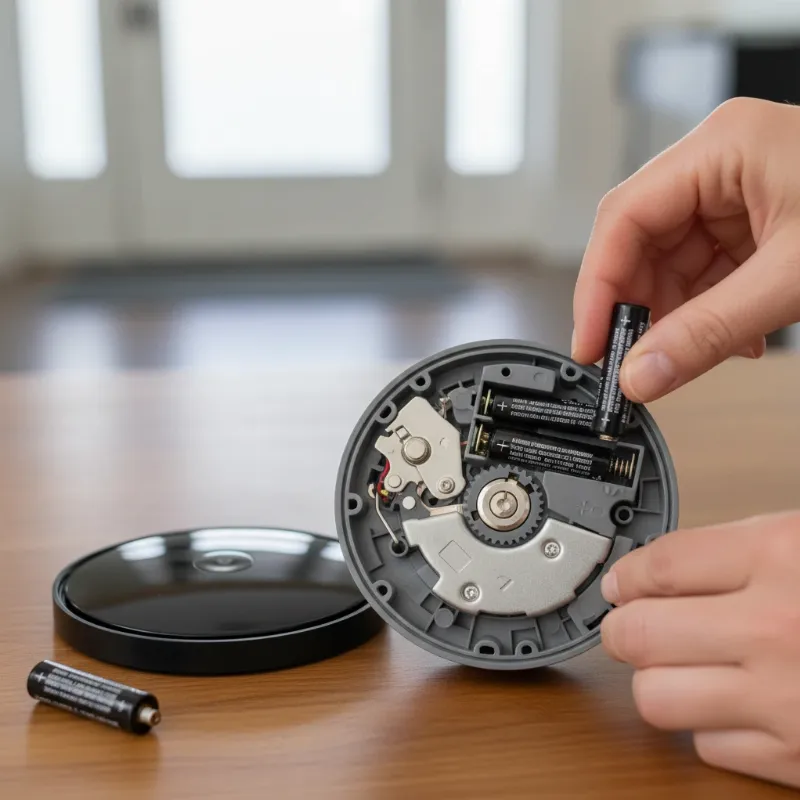 Hands replacing AA batteries in an August Smart Lock Pro, showing the faceplate removed and new batteries inserted correctly.
Step-by-Step Battery Replacement for August Wi-Fi Smart Lock (4th Gen)
The August Wi-Fi Smart Lock (4th Generation) has a slightly different battery replacement procedure, requiring two CR123A lithium batteries. These high-quality lithium batteries are recommended for optimal performance and longevity, especially given the lock’s integrated Wi-Fi capabilities.
To access the battery compartment, locate the ‘a’ symbol on the front cover of your August Wi-Fi Smart Lock. Push gently but firmly on this symbol, and the cover will detach. Once the cover is off, you will see the two CR123A batteries. Carefully remove the depleted batteries from their slots. Insert the two new CR123A batteries, paying close attention to ensure correct polarity as marked inside the compartment. After the new batteries are in place, reattach the front cover, pressing it until you hear a secure click, indicating it’s locked into position. Your lock should now be powered up and ready for continued smart operation.
Choosing the Right Batteries for Optimal Performance
Selecting the correct battery type is more than just a matter of size; it’s crucial for your August Smart Lock’s optimal functionality and longevity. For the August Smart Lock Pro and earlier models, standard alkaline AA batteries are the recommended choice. It’s important to note that lithium and extended-life alkaline batteries are generally not advised for these models, as they can sometimes lead to erroneous low battery alerts or other operational inconsistencies. Sticking to standard alkaline helps ensure reliable performance and accurate battery level reporting.
For the August Wi-Fi Smart Lock (4th Generation), high-quality lithium CR123A batteries are specifically recommended. The built-in Wi-Fi feature of this model draws more power, and lithium batteries offer the necessary durability and consistent voltage for sustained operation. Investing in reputable brands for CR123A batteries will help maximize the time between replacements and maintain the lock’s responsiveness. Always ensure you have the right type on hand when your smart lock signals it’s time for a battery change.
Maximizing Your August Smart Lock’s Battery Life
While August Smart Locks are designed for convenience, several factors can influence how long their batteries last. Understanding these can help you extend battery life and minimize the frequency of replacements. The primary battery drainer for Wi-Fi models is the strength and stability of your Wi-Fi connection; frequent reconnections or a weak signal force the lock to work harder, consuming more power. Similarly, how often you lock and unlock your door, particularly when using remote access via Wi-Fi, directly impacts battery consumption.
To extend the lifespan of your August Smart Lock’s batteries, consider these practical tips. Ensure your Wi-Fi router is positioned optimally for a strong signal to your lock, reducing the need for constant reconnection. For older models, if you rely heavily on remote access, using an August Connect bridge can sometimes offload some of the Wi-Fi strain from the lock itself, potentially extending its battery life. Regularly checking the August app for battery status allows you to proactively plan replacements rather than being caught off guard. By optimizing your setup and being mindful of usage, you can enjoy longer periods between battery changes.
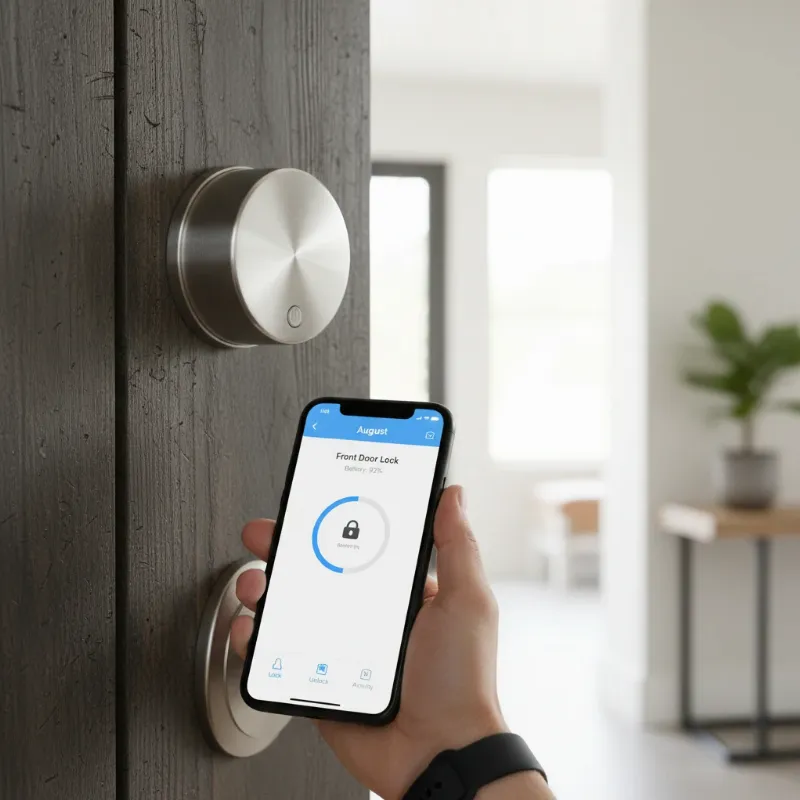 August Smart Lock on a door with a phone showing the August app's battery status, emphasizing battery life optimization.
Troubleshooting Common August Smart Lock Battery Issues
Even with careful maintenance, you might occasionally encounter issues with your August Smart Lock related to batteries. One common problem is the lock not responding immediately after a battery change. In such cases, double-check that the batteries are inserted with the correct polarity and that the faceplate or cover is securely reattached. Sometimes, simply removing and reinserting the batteries can resolve a minor connection glitch.
Another issue users report is inaccurate battery level readings or rapid battery drain. If your lock seems to be consuming batteries unusually fast, verify that you are using the correct type and brand of batteries recommended for your specific August model. For Wi-Fi Smart Locks, a consistently weak Wi-Fi signal might be causing excessive battery drain; consider relocating your router or improving signal strength. Remember, in any emergency, your August Smart Lock can always be opened with a traditional physical key, providing a reliable backup. If persistent problems arise, consulting the August support website or contacting their customer service for specific troubleshooting advice is always a good idea.
“A smart lock is only as smart as its power source. Timely battery changes are not just maintenance; they’re a cornerstone of reliable smart home security.” – Alex Chen, Smart Home Technology Expert
Conclusion
Keeping your August Smart Lock powered up and ready is a simple yet crucial part of a secure and convenient smart home experience. Whether you own an August Smart Lock Pro or the latest August Wi-Fi Smart Lock, understanding the specific battery requirements and following the straightforward replacement steps ensures continuous, reliable operation. By being proactive with battery changes, choosing the right battery types, and adopting practices to maximize their lifespan, you can enjoy peace of mind knowing your door is always secure and accessible. Embrace the full potential of your smart lock by making battery maintenance a priority.
Ready to enhance your home security with an August Smart Lock or need to find the perfect replacement batteries? Visit SmartLocksPro.com today to explore our extensive range of products and expert advice, ensuring your smart home stays powered and protected. What steps will you take to ensure your smart lock’s batteries are always in top condition?
Frequently Asked Questions
How often should August Smart Lock batteries be changed?
|
Our Picks for the Best smart locks in 2026
As an Amazon Associate I earn from qualifying purchases.
|
||
| Num | Product | Action |
|---|---|---|
| 1 | Tapo Smart Wi-Fi Deadbolt Door Lock – Keyless Tactile Buttons, Customized Access with in-App Monitoring, Auto-Lock, IP54 Weatherproof, BHMA Grade 3, Compatible with Standard Door Sizes, Tapo DL100 |

|
| 2 | ULTRALOQ U-Bolt Pro WiFi Smart Lock with Door Sensor, 8-in-1 Keyless Entry Door Lock with Fingerprint ID, App Remote Control, Built-in WiFi Keypad Deadbolt, Auto Unlock, IP65 Waterproof, Easy Install |
|
| 3 | Smart Door Handle Lock with Keypad: Yamiry Fingerprint Smart Knob - Keyless Entry Digital Lock for Front Door - Deadbolt with APP - Generate Passcode Remotely - DIY Installation |
|
| 4 | Smart Door Lock with Camera Fingerprint Keyless Entry Door Lock Electronic Deadbolt with Keypad Code, App Remote Control, Auto Unlock for Front Door |
|
| 5 | Wyze Palm Lock, Smart Door Lock with Palm Vein Recognition, Keyless Entry Smart Locks for Front Door, Keypad, Auto Lock, Dual Battery, Wi-Fi, Works with Alexa & Google, BHMA, IP53, Mechanical Key |
|
| 6 | Schlage Encode Smart WiFi Deadbolt Lock for Front Door - Keyless Entry with App or Touchscreen - Works with Alexa, Hey Google, & Airbnb - Create Codes for Guests - Matte Black |
|
| 7 | TEEHO TE001 Keyless Entry Door Lock with Keypad - Smart Deadbolt Lock for Front Door with 2 Keys - Auto Lock - Easy Installation - Matte Black |
|
| 8 | Schlage Encode Smart WiFi Deadbolt Lock for Front Door - Keyless Entry with App or Touchscreen - Works with Alexa, Hey Google, & Airbnb - Create Codes for Guests - Satin Nickel Silver |
|
| 9 | Yale Security Assure Lock 2 Deadbolt, Black Suede Keyed Smart Entry Door Lock with Wi-Fi Connected Keypad for Code Entry and Remote Access, YRD410-WF1-BSP |
|
| 10 | Wyze Auto-Lock Bolt v2, Fingerprint Keyless Entry Smart Lock, AI Learning Scanner with Wi-Fi Front Door Lock Deadbolt, Auto-Lock, 8 Months Battery, BHMA2, IP53, Anti-Peep Keypad, Backup Keys |
|
The frequency depends on your model and usage. August Smart Lock Pro and earlier models typically last 6 months to a year on AA batteries. The August Wi-Fi Smart Lock (4th Gen) usually requires CR123A battery replacement every 3-6 months, though this can vary with Wi-Fi signal strength and door activity. The August app will notify you when it’s time.
What kind of batteries do August Smart Locks use?
The August Smart Lock Pro and older models use four AA alkaline batteries. The August Wi-Fi Smart Lock (4th Generation) uses two CR123A lithium batteries. Always check your specific model to ensure you purchase the correct type for optimal performance.
What happens if August Smart Lock batteries die completely?
If the batteries in your August Smart Lock die completely, the smart functionalities will cease, meaning you won’t be able to lock or unlock it remotely or via the app. However, all August Smart Locks retain the ability to be opened manually with your traditional physical key, ensuring you are never locked out of your home.
Can I use rechargeable batteries in my August Smart Lock?
August generally recommends against using rechargeable batteries for most of its smart lock models, particularly those using AA batteries. Rechargeable batteries can sometimes provide inconsistent voltage, leading to inaccurate battery level readings or premature low battery warnings. For the August Wi-Fi Smart Lock, using high-quality disposable lithium CR123A batteries is recommended for reliable performance.