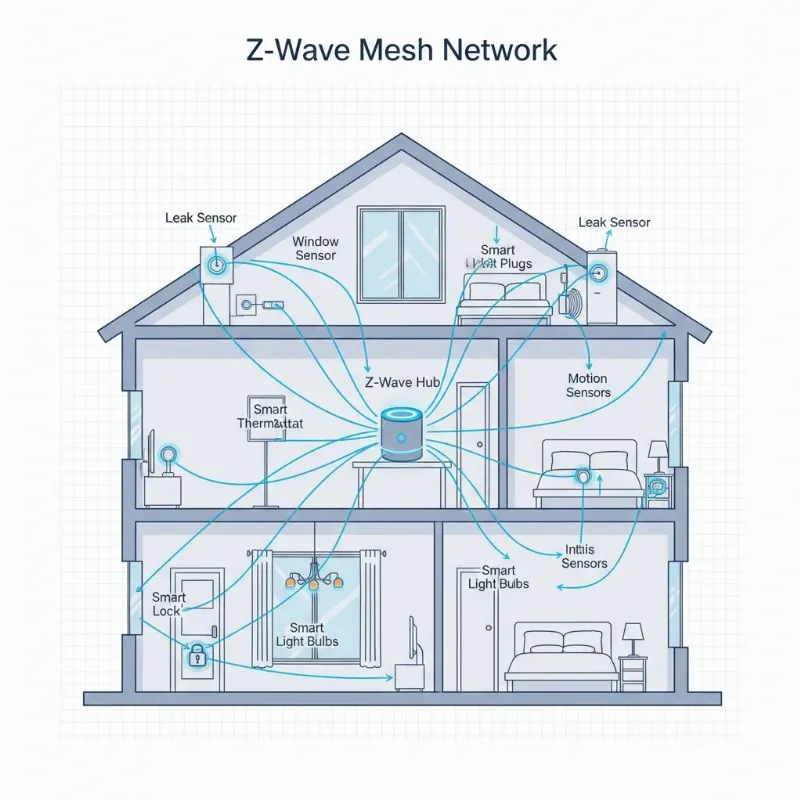
Stepping into the world of smart home technology, particularly smart locks, opens up a realm of convenience and enhanced security. Yet, beneath the sleek designs and keyless entry lies a crucial decision: the communication protocol that connects your smart lock to your digital ecosystem. It’s not just about locking and unlocking a door; it’s about reliable communication, battery efficiency, and seamless integration. For many, the choice boils down to three primary contenders: Wi-Fi, Bluetooth, and Z-Wave.
Smart locks have evolved dramatically over the past decade, transforming from simple remote-controlled devices to sophisticated security systems integrated with artificial intelligence. This evolution offers diverse functionalities, but understanding how these systems talk to each other is paramount. Each connectivity option brings its own set of strengths and weaknesses in terms of range, speed, power consumption, and overall smart home compatibility. Making an informed decision ensures your smart lock truly enhances your lifestyle.
What Are Smart Locks?
A smart lock is an electromechanical lock designed to perform locking and unlocking operations on a door when it receives instructions from an authorized device using a wireless protocol and cryptographic key to execute the authorization process. These advanced devices offer more than just basic security; they provide unprecedented control and flexibility over your home’s access points. From granting temporary access to monitoring entry and exit, smart locks bring your front door into the digital age.
The common types of smart locks are often defined by their primary method of communication. These include models that leverage Wi-Fi for broad remote access, Bluetooth for localized smartphone control, and Z-Wave or Zigbee for robust smart home network integration. Historically, locks were purely mechanical, relying on physical keys. The advent of electronic locks introduced keypads, and with the rise of the internet and smart devices, these locks began incorporating wireless technologies, paving the way for the sophisticated, interconnected systems we see today.
The Superior Advantages of Smart Locks
Smart locks are more than just a novelty; they offer a suite of benefits that traditional locks simply cannot match, fundamentally changing how we interact with our homes.
Unparalleled Convenience and Ease of Use
|
Our Picks for the Best smart locks in 2026
As an Amazon Associate I earn from qualifying purchases.
|
||
| Num | Product | Action |
|---|---|---|
| 1 | Yale Security Assure Lock 2 Deadbolt, Black Suede Keyed Smart Entry Door Lock with Wi-Fi Connected Keypad for Code Entry and Remote Access, YRD410-WF1-BSP |

|
| 2 | Wyze Auto-Lock Bolt v2, Fingerprint Keyless Entry Smart Lock, AI Learning Scanner with Wi-Fi Front Door Lock Deadbolt, Auto-Lock, 8 Months Battery, BHMA2, IP53, Anti-Peep Keypad, Backup Keys |
|
| 3 | Wyze Palm Lock, Smart Door Lock with Palm Vein Recognition, Keyless Entry Smart Locks for Front Door, Keypad, Auto Lock, Dual Battery, Wi-Fi, Works with Alexa & Google, BHMA, IP53, Mechanical Key |
|
| 4 | Smart Door Handle Lock with Keypad: Yamiry Fingerprint Smart Knob - Keyless Entry Digital Lock for Front Door - Deadbolt with APP - Generate Passcode Remotely - DIY Installation |
|
| 5 | Schlage Encode Smart WiFi Deadbolt Lock for Front Door - Keyless Entry with App or Touchscreen - Works with Alexa, Hey Google, & Airbnb - Create Codes for Guests - Matte Black |
|
| 6 | ULTRALOQ U-Bolt Pro WiFi Smart Lock with Door Sensor, 8-in-1 Keyless Entry Door Lock with Fingerprint ID, App Remote Control, Built-in WiFi Keypad Deadbolt, Auto Unlock, IP65 Waterproof, Easy Install |
|
| 7 | TEEHO TE001 Keyless Entry Door Lock with Keypad - Smart Deadbolt Lock for Front Door with 2 Keys - Auto Lock - Easy Installation - Matte Black |
|
| 8 | Smart Door Lock with Camera Fingerprint Keyless Entry Door Lock Electronic Deadbolt with Keypad Code, App Remote Control, Auto Unlock for Front Door |
|
| 9 | Schlage Encode Smart WiFi Deadbolt Lock for Front Door - Keyless Entry with App or Touchscreen - Works with Alexa, Hey Google, & Airbnb - Create Codes for Guests - Satin Nickel Silver |
|
| 10 | Tapo Smart Wi-Fi Deadbolt Door Lock – Keyless Tactile Buttons, Customized Access with in-App Monitoring, Auto-Lock, IP54 Weatherproof, BHMA Grade 3, Compatible with Standard Door Sizes, Tapo DL100 |
|
Imagine never fumbling for keys again. Smart locks offer keyless entry through various methods like PIN codes, fingerprint recognition, or smartphone apps, making daily access effortless. Beyond keyless entry, many smart locks allow you to manage access remotely. Whether you need to let in a pet-sitter while you’re at work or grant temporary access to a delivery person, you can do it all from your phone, no matter where you are. This level of control streamlines daily life and eliminates the worry of lost or forgotten keys.
Enhanced Security Features
Modern smart locks provide a robust layer of security that goes beyond the physical deadbolt. They often include advanced encryption to protect wireless communications, tamper alarms that notify you of attempted break-ins, and activity logs that record who enters and exits your home. Some models even integrate with home security systems to trigger alarms or cameras in suspicious situations. This combination of physical and digital protection offers a comprehensive security solution for your property.
Intelligent and Integrated Functionality
The true power of smart locks often lies in their ability to integrate with broader smart home ecosystems. Connecting your lock to a smart hub or voice assistant like Amazon Alexa or Google Home allows for voice control and the creation of automated routines. For example, your lock can automatically secure itself when your smart thermostat senses you’ve left the house, or unlock when you arrive. These integrations create a seamless, responsive living environment.
Modern and Diverse Designs
Beyond functionality, smart locks boast a wide array of contemporary designs that can complement any home aesthetic. From sleek, minimalist keypads to elegant touchscreen models and even designs that discreetly fit over your existing deadbolt, there’s a smart lock to match your style. This blend of form and function ensures that your security solution also enhances your home’s curb appeal.
Popular Smart Lock Connectivity Types in the Market
When selecting a smart lock, understanding the core connectivity options – Wi-Fi, Bluetooth, and Z-Wave – is crucial. Each has distinct characteristics that affect performance, convenience, and compatibility within your smart home.
Wi-Fi Locks
Wi-Fi smart locks connect directly to your home’s existing Wi-Fi network, providing immediate internet access.
- Advantages: The biggest draw of Wi-Fi locks is their direct remote access. You can lock or unlock your door from virtually anywhere in the world using your smartphone app, as long as you have an internet connection. They often integrate seamlessly with other Wi-Fi enabled smart devices and platforms without needing an additional hub. This direct connection simplifies setup for many users.
- Disadvantages: The primary drawback is power consumption. Maintaining a constant Wi-Fi connection requires a significant amount of battery power, meaning more frequent battery changes compared to other protocols. Wi-Fi networks can also be susceptible to congestion, potentially leading to slower response times or dropped connections, especially in busy network environments.
- Ideal Use: Wi-Fi locks are best suited for users who prioritize immediate and constant remote access, have a robust home Wi-Fi network, and don’t mind more frequent battery replacements. They are excellent for managing rental properties or for individuals who frequently need to grant access from afar.
Bluetooth Locks
Bluetooth smart locks establish a direct, short-range connection with your smartphone or another paired device.
- Advantages: Bluetooth excels in battery efficiency due to its low power consumption, resulting in significantly longer battery life for your smart lock. This local-only operation also enhances security against remote hacking attempts, as the lock isn’t constantly exposed to the internet. They are typically straightforward to set up, pairing directly with your phone.
- Disadvantages: The main limitation is range. Bluetooth connections are generally effective only within close proximity to the lock, usually within the same room. Remote access requires a Bluetooth bridge or hub, which then connects to your Wi-Fi network, adding an extra component and potentially cost. This can be less convenient if remote functionality is a priority.
- Ideal Use: Bluetooth locks are ideal for individuals who primarily need keyless entry and local control, valuing long battery life and enhanced privacy. They are a great choice for apartments or homes where you mostly use the lock when physically present.
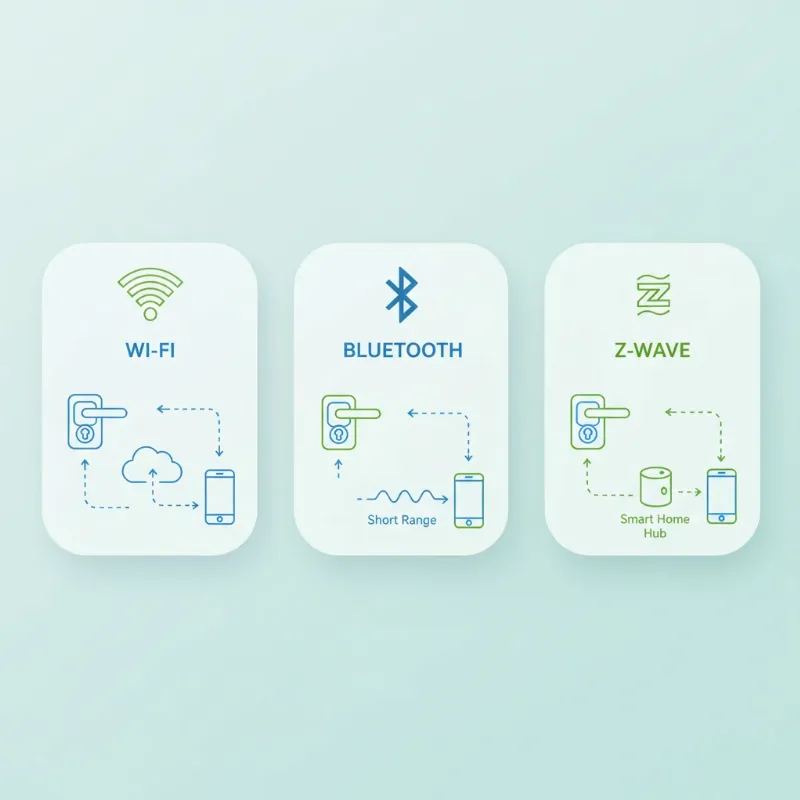 Different types of smart lock connectivity options: Wi-Fi, Bluetooth, and Z-Wave icons illustrated with flowing lines representing their network connections to a central smart home hub and a smartphone.
Z-Wave Locks
Z-Wave is a wireless protocol specifically designed for home automation, forming a mesh network among compatible devices.
- Advantages: Z-Wave offers exceptional reliability and a robust mesh network that can extend connectivity over longer distances by relaying signals through other Z-Wave devices. This creates a stable, self-healing network, ideal for larger homes or those with multiple smart devices. Z-Wave devices are also highly energy-efficient, contributing to excellent battery life for smart locks. Crucially, Z-Wave networks operate independently of your home Wi-Fi for device communication, meaning your smart locks can still function locally even during internet outages.
- Disadvantages: The primary requirement for a Z-Wave smart lock is a dedicated Z-Wave hub, such as SmartThings or Hubitat, to facilitate communication and provide remote access. This adds to the initial cost and setup complexity. Data transfer speeds are typically lower than Wi-Fi, though this is rarely an issue for smart lock commands.
- Ideal Use: Z-Wave is the preferred choice for serious smart home enthusiasts building a comprehensive, integrated ecosystem. It’s perfect for homes with many smart devices that benefit from a reliable, low-power mesh network and where local control during internet disruptions is important.
Comparison Table of Smart Lock Connectivity Types
To help you visualize the differences, here’s a comparative overview of Wi-Fi, Bluetooth, and Z-Wave smart lock connectivity.
| Feature | Wi-Fi Smart Locks | Bluetooth Smart Locks | Z-Wave Smart Locks |
|---|---|---|---|
| Security | High (with encryption) | High (local operation) | Very High (dedicated protocol) |
| Convenience | Excellent (direct remote) | Good (local, app-based) | Excellent (remote via hub) |
| Cost | Medium (often no extra hub) | Low to Medium | Medium to High (hub required) |
| Range | Wide (depends on home Wi-Fi) | Short (room-specific) | Long (mesh network) |
| Hub Required | No | Yes (for remote access) | Yes |
| Battery Life | Lower (more frequent changes) | Higher (extended life) | High (excellent efficiency) |
How to Choose the Right Smart Lock Connectivity
Choosing the ideal smart lock connectivity requires a thoughtful evaluation of your personal needs, current home setup, and future smart home aspirations. There isn’t a one-size-fits-all answer, but by considering these factors, you can make an informed decision.
First, determine your usage needs and priorities. Do you need constant remote access to manage deliveries or guests from anywhere? A Wi-Fi lock might be your best bet, offering direct control. If your priority is primarily keyless entry when you’re physically at home and extended battery life, a Bluetooth lock could be perfectly sufficient. For those building a robust, whole-home smart system where reliability and local control are paramount, a Z-Wave lock integrated with a hub offers superior performance. Consider the type of door you have and the desired level of security.
Next, evaluate your existing smart home ecosystem. Do you already have a smart home hub like SmartThings or Hubitat? If so, a Z-Wave lock will integrate seamlessly and leverage your existing network. If your home is primarily built around Wi-Fi devices and voice assistants like Alexa or Google Home, a Wi-Fi lock will likely be the easiest to set up and manage. Understanding your current setup will help avoid compatibility issues and redundant devices. Don’t forget to consider your budget; while individual lock prices vary, the need for an additional hub (for Z-Wave or remote Bluetooth access) can impact the overall cost.
Finally, always research reputable brands and read user and expert reviews. Brands like Philips, Yale, Samsung, and Xiaomi offer a range of smart locks across different connectivity types. Pay attention to feedback regarding battery life, app stability, installation complexity, and customer support. Checking the warranty and technical support policies is also a crucial step, ensuring you have assistance if any issues arise.
Tips for Using and Maintaining Smart Locks Properly
To ensure your smart locks perform optimally and remain a reliable part of your home security, proper usage and consistent maintenance are key.
One of the most critical maintenance tasks is to replace batteries regularly. Wi-Fi locks, especially, will deplete batteries faster due to constant connection, so establish a routine, perhaps every 3-6 months, or respond promptly to low battery alerts from the app. For Bluetooth and Z-Wave locks, battery life is generally much longer, sometimes lasting over a year, but regular checks are still advisable. Additionally, clean your lock regularly to prevent dust and debris from affecting its mechanical or electronic components. A soft, dry cloth is usually sufficient for external surfaces, while specialized products may be needed for keypads or fingerprint readers.
Beyond physical care, regularly update your smart lock’s software or firmware. Manufacturers often release updates to enhance security, fix bugs, and improve functionality. These updates are crucial for patching potential vulnerabilities and ensuring your lock operates with the latest safeguards. Always download updates from official sources. Furthermore, never share your passwords or access codes indiscriminately with strangers. Use temporary codes for guests or service providers and revoke them once access is no longer needed. Opt for strong, unique passwords for your smart lock apps and enable two-factor authentication whenever possible.
Should you encounter any issues, your first step should always be to consult the manufacturer’s troubleshooting guide or contact their customer support. Many common problems can be resolved with simple steps, but for persistent or complex issues, professional assistance is invaluable.
Common Smart Lock Issues and Troubleshooting
Even with advanced technology, smart locks can encounter occasional glitches. Knowing how to identify and address common issues can save you time and frustration.
One frequent problem is the lock not recognizing fingerprints or codes. This can often be due to dirty sensors (for fingerprint readers), smudged keypads, or simply incorrect entry. Try cleaning the sensor or keypad and re-entering the code carefully. If the issue persists, try re-calibrating the fingerprint reader or resetting the code within the lock’s app. For code-related issues, ensure the user code is still active and hasn’t been accidentally deleted or expired.
Battery drainage is another common concern, especially with Wi-Fi locks. If your batteries are depleting faster than expected, check the battery type; always use the manufacturer-recommended batteries. Ensure your Wi-Fi signal is strong; a weak signal can cause the lock to constantly search for a connection, draining power faster. In some cases, a firmware update might resolve power optimization issues.
Occasionally, a smart lock might become physically jammed or unresponsive. First, check for any physical obstructions in the deadbolt or door frame that might prevent the lock from extending or retracting smoothly. Ensure the door is properly aligned and not sagging. If the lock is completely unresponsive, a hard reset (often involving removing and reinserting batteries or pressing a reset button) can often resolve temporary electronic freezes. As a last resort, using the physical key override, if available, can grant access and allow for further troubleshooting.
Finally, concerns about hacking are always present with internet-connected devices. While manufacturers employ robust encryption, ensuring your home network is secure is vital. Use strong, unique Wi-Fi passwords, keep your router’s firmware updated, and consider a guest network for visitors. Most importantly, keep your smart lock’s firmware current, as updates often include security patches. If you suspect a breach, immediately change all associated passwords and contact the lock manufacturer’s support.
Future Trends in Smart Lock Technology
The landscape of smart lock technology is continuously evolving, promising even greater security, integration, and convenience in the years to come. The future of smart locks is poised to intertwine more deeply with the broader smart home ecosystem.
One significant trend is the integration of artificial intelligence (AI). AI will enable smart locks to learn user patterns and behaviors, predicting when someone might need access or detecting unusual activity more accurately. Imagine a lock that can differentiate between a family member’s hurried entry and a suspicious lingering presence, adjusting its security protocols dynamically. AI could also enhance biometric authentication, making fingerprint or facial recognition even faster and more reliable, adapting to slight changes in appearance or even injuries.
Furthermore, we’ll see enhanced connectivity with other smart home devices. The advent of universal standards like Matter is paving the way for seamless communication across different brands and platforms. This means your smart lock will integrate effortlessly with your smart lighting, thermostat, security cameras, and even appliances, creating a truly unified and responsive home environment. For instance, your lock could trigger specific lighting scenes upon entry or disarm your alarm system automatically as you approach.
Blockchain technology is also being explored to bolster smart lock security. By leveraging blockchain’s decentralized and immutable ledger, smart locks could offer unparalleled data integrity and tamper-proof access records, significantly reducing the risk of unauthorized access or data manipulation. This could lead to a new era of trust and transparency in home security.
Finally, expect the development of new and intuitive authentication methods. Beyond fingerprints and codes, future smart locks might incorporate advanced voice recognition, gesture control, or even passive authentication where the lock recognizes authorized individuals without any direct interaction. These innovations aim to make home access not just secure, but virtually invisible and effortless.
“A smart lock is not merely a device; it is a foundational component of a comprehensive, intelligent security solution for your home, constantly evolving to meet tomorrow’s demands.”
Conclusion
The journey through the world of smart lock connectivity reveals that the “best” choice is deeply personal, rooted in your lifestyle, your home’s unique needs, and your smart home aspirations. Whether you prioritize the widespread remote control of Wi-Fi, the energy-efficient, localized security of Bluetooth, or the robust, expansive mesh networking of Z-Wave, each protocol offers distinct advantages. By carefully weighing factors such as battery life, range, hub requirements, and integration with your existing smart home devices, you can confidently select the technology that best secures and simplifies your daily life.
Smart locks represent a significant leap forward in home security and convenience, moving beyond the limitations of traditional keys. They offer peace of mind through enhanced monitoring, flexible access management, and seamless integration with your connected home. Embracing this technology means investing in a smarter, safer, and more convenient future.
Are you ready to transform your home’s security with the perfect smart lock? Explore the possibilities and discover how the right connection can unlock a new level of control and comfort.
Frequently Asked Questions
Is Wi-Fi, Bluetooth, or Z-Wave more secure for smart locks?
All three protocols can offer high levels of security when implemented correctly by reputable manufacturers. Bluetooth’s local-only operation inherently reduces remote attack vectors. Wi-Fi locks use advanced encryption to protect data in transit. Z-Wave, as a dedicated smart home protocol, is designed with security layers. Ultimately, good security practices like strong passwords and regular firmware updates are crucial for any smart lock.
Do Z-Wave smart locks need a hub?
Yes, Z-Wave smart locks require a dedicated Z-Wave hub to function. This hub acts as the central controller for your Z-Wave network, allowing devices to communicate with each other and providing remote access through your home’s internet connection. While it’s an additional cost, it enables the robust mesh networking and energy efficiency that Z-Wave is known for.
Which connectivity has the best battery life for smart locks?
Bluetooth and Z-Wave smart locks generally offer significantly better battery life compared to Wi-Fi smart locks. This is because Bluetooth and Z-Wave are low-power protocols designed for infrequent communication, conserving energy. Wi-Fi, on the other hand, requires more power to maintain a constant connection to your home network, leading to more frequent battery changes.