Let’s be honest, we’ve all had that mini heart attack. You’re halfway to work, and the thought hits you: “Did I lock the front door?” For generations, the humble metal key was the only answer. But today, the conversation has shifted entirely. The debate over the best home security solution often boils down to the Smart Lock With Keypad Vs Keyless Entry. It’s not just about losing the key; it’s about gaining a whole new level of control and peace of mind. But which one is truly right for your lifestyle?
This isn’t just a simple choice between punching in a code and tapping your phone. It’s about understanding the core technology, the day-to-day convenience, and the security implications of each system. We’re here to break it all down, ditch the jargon, and help you make a decision that will make you feel safer and your life a whole lot easier. Understanding the nuances of modern access control is critical, and a key part of that is grasping the fundamentals of smart lock cloud security, which underpins many of these advanced features.
What’s the Real Difference, Anyway?
Before we dive deep, let’s clear up some confusion. The terms are often used interchangeably, but they represent two distinct philosophies of home access.
The Trusty Smart Lock with Keypad
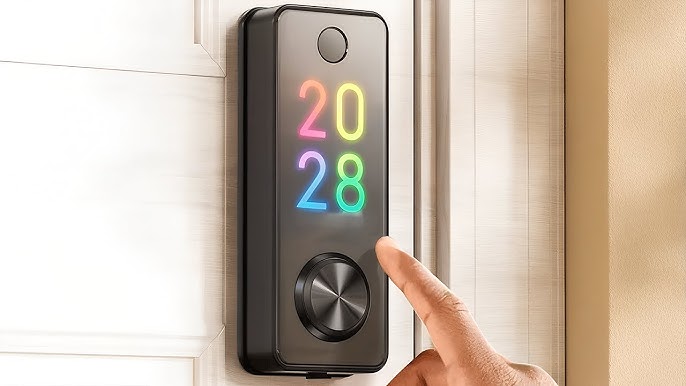
Think of this as the evolution of the garage door opener you grew up with. A smart lock with a keypad is a physical lock on your door that has a numeric pad. You can unlock it by:
- Entering a pre-set PIN code.
- Using a traditional physical key as a backup.
- Often, using a smartphone app via Bluetooth or Wi-Fi.
This is the hybrid model. It gives you the “keyless” option of a code but keeps the familiarity of a keyhole for emergencies or for those less tech-savvy family members. It’s the bridge between the old world and the new.
The Purely Keyless Entry System
This is where things get a bit more futuristic. A true keyless entry system often does away with the keypad and sometimes even the keyhole entirely. Access is granted through purely digital or biometric means, such as:
- Your Smartphone: The lock uses Bluetooth to detect when your phone is near and unlocks automatically (geofencing).
- Fingerprint Scanners: Just like your phone, a simple touch is all it takes.
- NFC/RFID Cards or Fobs: Tapping a small card or fob on the lock, much like you’d use a hotel keycard. This method is gaining traction, and understanding smart lock smartcard compatibility can open up new possibilities for convenient access.
These systems are designed for a truly seamless experience where you don’t have to break your stride to get inside.
The Showdown: Smart Lock with Keypad vs Keyless Entry
So, which one comes out on top? The answer depends entirely on your priorities. Let’s pit them against each other in the categories that matter most.
Round 1: Convenience and Accessibility
A smart lock with a keypad is the undisputed champion for guest and family access. Need to let in the dog walker, a contractor, or your in-laws? Just create a temporary code for them. No need for them to download an app or for you to be there. It’s simple and universally understood. For kids who don’t have smartphones yet, a simple code is a lifesaver.
A purely keyless system is arguably more convenient for you, the primary user. The door just unlocks as you approach—it feels like magic. However, granting access to others can be more cumbersome, often requiring them to download an app and set up an account.
Winner: Smart lock with keypad. Its flexibility for various users is hard to beat.
Round 2: Security
This is where the debate gets heated. Some argue that a keypad is a potential vulnerability. What if someone watches you enter your code? What if the keypad numbers wear down, revealing your most-pressed digits? While valid concerns, modern keypads have features like fingerprint-resistant screens and randomized number placement to combat this.
On the other hand, purely keyless systems rely on digital credentials. A lost phone can be a lost key if not properly secured with a strong passcode or biometrics. The core security of these locks lies in their encryption—most reputable brands use AES 128-bit or 256-bit encryption, which is considered military-grade.
As security consultant David Chen puts it, “A common mistake is focusing solely on the digital encryption while ignoring the physical strength of the lock. A hack-proof smart lock is useless if the deadbolt itself can be kicked in. Always look for an ANSI/BHMA Grade 1 or 2 rating, regardless of whether it has a keypad or not.”
Winner: It’s a tie. Both are incredibly secure when implemented correctly. The biggest vulnerability is almost always user error, not the technology itself.
Round 3: Reliability and Backup Options
What happens when the tech fails? If your phone battery dies, how do you get into your house with a phone-only keyless system? What if the Wi-Fi is down?
This is the Achilles’ heel of purely keyless systems. While many have backup power options (like touching a 9V battery to a terminal), it’s not exactly graceful.
The smart lock with a keypad shines here. Phone dead? Use the code. Power outage? Most are battery-operated and will work for months, plus you almost always have the physical key as a final failsafe. The multiple layers of redundancy provide incredible peace of mind.
Winner: Smart lock with keypad. The multiple backup options make it the more reliable choice in unpredictable situations.
How Do I Choose and Install the Right Smart Lock?
Feeling a little clearer? Choosing the right lock is the first step. Here’s a simple guide to get you started.
- Assess Your Door: Is it a standard deadbolt? Check the thickness and backset (the distance from the edge of the door to the center of the lock hole). Most smart locks are designed as easy replacements for existing deadbolts.
- Define Your Users: Who needs access? Just you and a partner? Or do you have kids, frequent guests, or service providers? The more people who need access, the more a keypad makes sense.
- Connectivity is Key: Do you need to unlock the door from your office across town? If so, you’ll need a Wi-Fi-enabled lock. If you only need to control it when you’re at home, Bluetooth is simpler and often more battery-efficient. For a deeper dive into this specific topic, exploring the differences between a smart lock with WiFi vs Bluetooth is essential for making an informed choice.
- Check Smart Home Compatibility: Are you an Alexa, Google Home, or Apple HomeKit household? Ensure the lock you choose integrates smoothly with your existing ecosystem. Unlocking your door with a voice command is a game-changer.
- Installation: Don’t be intimidated! Most smart lock installations are surprisingly simple and require only a screwdriver. The process usually involves:
- Removing your old deadbolt.
- Installing the new deadbolt and strike plate.
- Mounting the exterior assembly (the keypad or sensor).
- Connecting the interior assembly and inserting the batteries.
- Following the app instructions to calibrate the lock and set up your codes or digital keys.
|
Our Picks for the Best Smartlocks in 2025
As an Amazon Associate, we earn from qualifying purchases.
|
||
| Num | Product | Action |
|---|---|---|
| 1 | Schlage Encode Smart WiFi Deadbolt Lock for Front Door - Keyless Entry with App or Touchscreen - Works with Alexa, Hey Google, & Airbnb - Create Codes for Guests - Satin Nickel Silver |

|
| 2 | ULTRALOQ U-Bolt Pro WiFi Smart Lock with Door Sensor, 8-in-1 Keyless Entry Door Lock with Fingerprint ID, App Remote Control, Built-in WiFi Keypad Deadbolt, Auto Unlock, IP65 Waterproof, Easy Install |
|
| 3 | Keypad & Key Smart Door Lock, 50 User Codes, Waterproof, Auto Lock - Matte Black |
|
| 4 | Keypad Smart Door Lock with Knob, Yamiry Keyless Entry Digital Lock with Handle, Fingerprint Electronic Knob for Front Door, Generate Passcode Remotely, Easy Installation |
|
| 5 | Kwikset Powerbolt 250 10-Button Keypad Satin Nickel Transitional Electronic Deadbolt Door Lock, Featuring Convenient Keyless Entry, Customizable User Codes, Auto Locking |
|
| 6 | Smart Keypad Door Lock with Handle: NICE DIGI Keyless Entry Digital Lock for Front/Interior Door, Electronic Code Knob, Easy Installation |
|
| 7 | Yale Security Assure Lock 2 Deadbolt, Black Suede Keyed Smart Entry Door Lock with Wi-Fi Connected Keypad for Code Entry and Remote Access, YRD410-WF1-BSP |
|
| 8 | TEEHO TE001 Keyless Entry Door Lock with Keypad - Smart Deadbolt Lock for Front Door with 2 Keys - Auto Lock - Easy Installation - Matte Black |
|
| 9 | Schlage Encode Plus Smart Wi-Fi Lock for Front Door, Keyless Entry Deadbolt, Unlock with Apple Watch, Built-in WiFi and App Control, Easy Install, Alexa & Apple HomeKit Compatible, Matte Black |
|
| 10 | Keyless Entry Fingerprint Smart Lock with Handle & Keypad: Sifely Biometric Digital Electronic Lock with Code, Electric Deadbolt Door Knob for Front, Interior, Exterior & Bedroom Doors (Silver) |
|
Advanced Features and Smart Home Integration
The real magic happens when your smart lock stops being a standalone device and becomes part of a connected home.
- Auto-Lock: Set your door to automatically lock after a specified time, from 30 seconds to 5 minutes. No more second-guessing.
- Activity Logs: See a timestamped log of who has entered and when. It’s perfect for checking if the kids got home from school on time.
- Smart Home Routines: Integrate your lock into routines. For example, create a “Goodnight” scene that locks your door, turns off the lights, and adjusts the thermostat with a single command.
Security Pro-Tip: Always enable two-factor authentication (2FA) on the account associated with your smart lock app. This adds a critical layer of security, requiring a code from your phone in addition to your password, making it much harder for unauthorized users to gain access to your lock’s controls.
Frequently Asked Questions (FAQ)
Can a smart lock with keypad be hacked?
Technically, any connected device can be a target. However, reputable brands use strong encryption to protect the signal between your phone and the lock. The more likely risk is a weak password on your app account or someone guessing your PIN. Use complex, non-obvious codes.
What happens if the power or internet goes out?
Most smart locks are battery-powered, so a power outage won’t affect them. The keypad and physical key will still work. If your internet goes down, you’ll lose remote access (unlocking from afar), but Bluetooth and keypad functions will operate normally as they don’t rely on Wi-Fi.
How long do the batteries last in a smart lock?
This varies by model and usage, but you can typically expect anywhere from 6 to 12 months on a single set of AA batteries. All smart locks will give you ample warning via the app and often an indicator light on the lock itself when the batteries are running low.
Is it hard to install a smart lock myself?
Not at all! If you can use a screwdriver, you can likely install a smart lock. Most models are designed to fit standard door preparations and come with detailed instructions and even video tutorials. It usually takes less than an hour.
Can I still use my old key?
Most smart locks that feature a keypad also come with a traditional keyhole as a backup, allowing you to use a physical key if you choose. Some purely keyless models eliminate the keyhole for a sleeker look and to prevent lock-picking.
The Final Lock-Up: Making Your Choice
So, when the dust settles in the smart lock with keypad vs keyless entry battle, which one should you install on your front door?
For the vast majority of households, the smart lock with a keypad offers the perfect blend of modern convenience and practical flexibility. It provides easy access for family, guests, and services without sacrificing the seamless entry you want for yourself. The multiple layers of backup (code, app, and physical key) deliver unparalleled peace of mind.
A purely keyless system is a fantastic choice for the tech-forward individual or couple living in a highly connected smart home, who value ultimate convenience and a minimalist aesthetic above all else.
Upgrading your lock is one of the most impactful smart home changes you can make. It’s not just about adding a gadget; it’s about fundamentally changing your relationship with your home’s security, making it more intelligent, responsive, and tailored to your life. Go ahead, ditch the keys, and step into a smarter, more secure home.