Choosing the right smart lock can dramatically enhance your home’s security and convenience. As a technician with over a decade of experience in smart lock technology, I’ve seen firsthand how these devices have evolved from simple keypads to sophisticated systems. When considering an upgrade, a common dilemma homeowners face is deciding between a smart lock that integrates with a handle (an all-in-one unit) and a smart deadbolt that works alongside your existing handle. This guide will help you navigate the options, ensuring you select the perfect smart lock solution for your lifestyle and security needs.
Understanding Smart Locks: Beyond the Key
|
Our Picks for the Best smart locks in 2026
As an Amazon Associate I earn from qualifying purchases.
|
||
| Num | Product | Action |
|---|---|---|
| 1 | Wyze Palm Lock, Smart Door Lock with Palm Vein Recognition, Keyless Entry Smart Locks for Front Door, Keypad, Auto Lock, Dual Battery, Wi-Fi, Works with Alexa & Google, BHMA, IP53, Mechanical Key |

|
| 2 | Smart Door Handle Lock with Keypad: Yamiry Fingerprint Smart Knob - Keyless Entry Digital Lock for Front Door - Deadbolt with APP - Generate Passcode Remotely - DIY Installation |
|
| 3 | Yale Security Assure Lock 2 Deadbolt, Black Suede Keyed Smart Entry Door Lock with Wi-Fi Connected Keypad for Code Entry and Remote Access, YRD410-WF1-BSP |
|
| 4 | Wyze Auto-Lock Bolt v2, Fingerprint Keyless Entry Smart Lock, AI Learning Scanner with Wi-Fi Front Door Lock Deadbolt, Auto-Lock, 8 Months Battery, BHMA2, IP53, Anti-Peep Keypad, Backup Keys |
|
| 5 | Smart Door Lock with Camera Fingerprint Keyless Entry Door Lock Electronic Deadbolt with Keypad Code, App Remote Control, Auto Unlock for Front Door |
|
| 6 | TEEHO TE001 Keyless Entry Door Lock with Keypad - Smart Deadbolt Lock for Front Door with 2 Keys - Auto Lock - Easy Installation - Matte Black |
|
| 7 | Tapo Smart Wi-Fi Deadbolt Door Lock – Keyless Tactile Buttons, Customized Access with in-App Monitoring, Auto-Lock, IP54 Weatherproof, BHMA Grade 3, Compatible with Standard Door Sizes, Tapo DL100 |
|
| 8 | Schlage Encode Smart WiFi Deadbolt Lock for Front Door - Keyless Entry with App or Touchscreen - Works with Alexa, Hey Google, & Airbnb - Create Codes for Guests - Matte Black |
|
| 9 | ULTRALOQ U-Bolt Pro WiFi Smart Lock with Door Sensor, 8-in-1 Keyless Entry Door Lock with Fingerprint ID, App Remote Control, Built-in WiFi Keypad Deadbolt, Auto Unlock, IP65 Waterproof, Easy Install |
|
| 10 | Schlage Encode Smart WiFi Deadbolt Lock for Front Door - Keyless Entry with App or Touchscreen - Works with Alexa, Hey Google, & Airbnb - Create Codes for Guests - Satin Nickel Silver |
|
Smart locks are electronic locking systems that offer keyless entry and remote control, moving beyond the traditional mechanical key. They leverage technology to provide enhanced security, convenience, and connectivity within your home.
The evolution of smart locks has been rapid, beginning with basic keypad entry and progressing to advanced biometric scanning, smartphone app control, and seamless integration with broader smart home ecosystems. Today, these intelligent devices allow you to lock or unlock your door from virtually anywhere, grant temporary access to guests, and monitor entry and exit activity in real time.
Different types of smart locks cater to various preferences and existing door configurations. Some replace only the deadbolt, others integrate the locking mechanism into a complete handle set, and a growing number offer advanced biometric or facial recognition features.
The Integrated Smart Lock with Handle: A Comprehensive Solution
An integrated smart lock with a handle, often called a handleset smart lock, replaces both your existing doorknob or lever and your deadbolt with a single, unified smart locking system. This design offers a cohesive look and often a streamlined installation process as you’re typically replacing an entire assembly.
Integrated smart locks bring a host of advantages to your entryway. They often boast a sleeker, more modern aesthetic, as the smart technology is seamlessly incorporated into the handle and deadbolt unit. Installation can feel more straightforward since you’re dealing with one complete system rather than two separate components. More importantly, these all-in-one solutions can provide comprehensive smart control over both the primary latching mechanism and the deadbolt, offering a fully connected entry experience. You might control both the handle and deadbolt locking actions from a single app or keypad interface, simplifying daily use.
However, opting for an integrated smart lock with a handle also comes with its disadvantages. They are generally more expensive than smart deadbolt-only options because they encompass more hardware. Finding a style that perfectly matches your home’s architecture and your personal taste might also be more challenging due to the limited design options compared to traditional handlesets. In some cases, extensive door modification might be necessary for proper installation, particularly if your existing door prep doesn’t align with the new unit. Moreover, if any component of the integrated system fails, it could potentially impact the entire lock’s functionality, requiring a more complex repair or replacement.
The Smart Deadbolt Only: Focused Security
A smart deadbolt only system involves replacing just your existing deadbolt with a smart mechanism, while retaining your current doorknob or lever handle. This approach is popular for those seeking to upgrade their door’s security and convenience without altering the entire door hardware.
Choosing a smart deadbolt-only option offers distinct advantages. It allows you to keep your existing handle, which can be beneficial if you’re fond of its style or if it matches other hardware in your home. This often results in a more cost-effective upgrade since you’re only purchasing and installing one component. The installation process for a smart deadbolt can also be simpler for DIY enthusiasts, as it typically involves fewer steps than replacing an entire handleset. Many smart deadbolts are designed to retrofit standard door preparations, minimizing the need for complex drilling or modifications.
Despite their benefits, smart deadbolt-only setups do have some drawbacks. A primary concern can be the aesthetic mismatch if your existing handle doesn’t visually complement the new smart deadbolt. Since the handle remains separate, it won’t typically offer smart functionalities like the deadbolt. This means you might still need to manually engage the handle’s latch, leading to a slightly less integrated smart experience compared to an all-in-one system. For ultimate convenience and a unified smart home experience, some users might find this two-component approach less seamless.
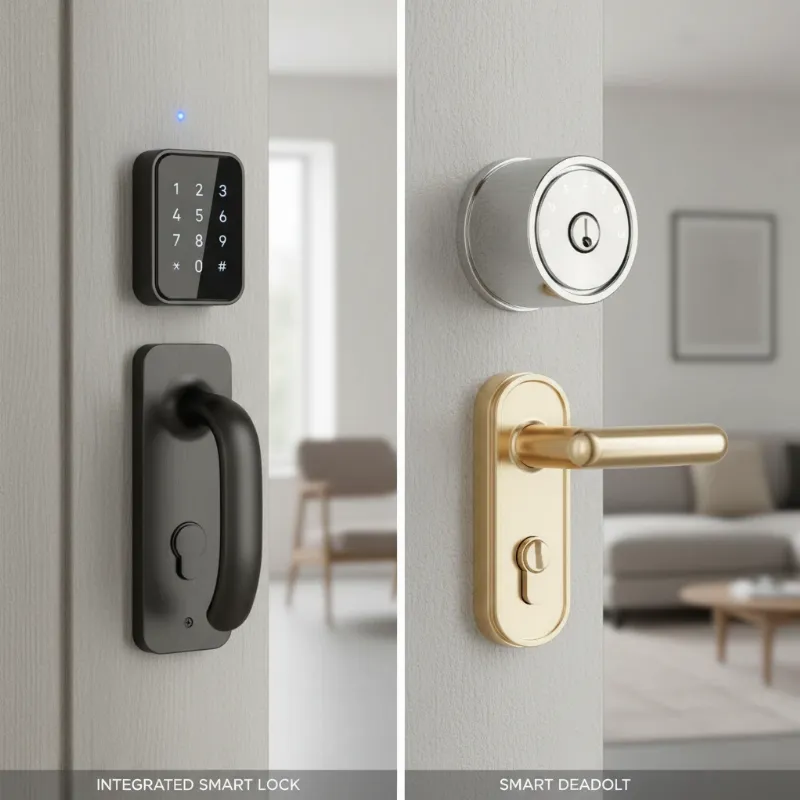 A side-by-side comparison of an integrated smart lock with a handle and a smart deadbolt only, highlighting their distinct designs for a smart home.
Table: Comparing Smart Lock with Handle vs. Smart Deadbolt Only
| Feature | Smart Lock with Handle (Integrated) | Smart Deadbolt Only |
|---|---|---|
| Aesthetics | Unified, modern design | Retains existing handle; potential for mismatch |
| Installation | Replaces entire handleset; potentially more involved | Replaces only deadbolt; often simpler for DIY |
| Cost | Generally higher upfront due to more hardware | Often more affordable as it’s a single component |
| Control | Unified control over latch and deadbolt (if applicable) | Smart control primarily over deadbolt; manual handle |
| Door Prep | May require specific sizing/modifications | Usually fits standard deadbolt holes |
| Flexibility | Less flexible in changing handle style | Allows retaining or changing handle independently |
| Convenience | Seamless all-in-one operation | Two separate locking actions (smart deadbolt, manual handle) |
Key Considerations for Your Choice
Making the right decision between a smart lock with a handle and a smart deadbolt only requires careful evaluation of several factors that align with your priorities and home environment.
Security Needs: When it comes to security, both options offer substantial improvements over traditional mechanical locks. Smart locks provide digital protections like fingerprint scanning, intrusion alerts, and remote monitoring. High-quality smart locks, whether integrated or deadbolt-only, match or exceed the physical strength of conventional deadbolts, often featuring built-in alarms that notify you of any disturbance at the door. Consider if you prioritize advanced digital security features such as real-time activity logs and tamper alerts, or if the robust physical security of a high-grade deadbolt is paramount. While smart locks typically offer more features, remember that the overall security of your door also depends on the door frame and door material itself.
Convenience and Access Management: The primary allure of smart locks is their unparalleled convenience. Keyless entry via PIN codes, fingerprints, smartphone apps, or even voice commands eliminates the hassle of physical keys. For busy homeowners or those with frequent guests, service providers, or renters, the ability to manage access remotely is invaluable. You can program unique, time-sensitive access codes, grant temporary access from anywhere, and receive instant alerts when someone enters your home. Smart deadbolt-only options provide these keyless entry benefits for the deadbolt, while integrated handle locks might offer a more cohesive keyless experience across both the handle and deadbolt.
Aesthetics and Door Compatibility: Your door is a focal point of your home’s exterior, so aesthetics matter. An integrated smart lock with a handle offers a unified design, presenting a clean and modern look. However, these all-in-one systems might have fewer style and finish options compared to the vast array of traditional handlesets. If you choose a smart deadbolt only, you can retain your existing handle, preserving your current door’s style. Ensure that any smart lock you consider is compatible with your door’s thickness and existing bore holes to avoid costly modifications or an unsightly installation.
Budget and Installation: Smart locks are an investment. Integrated smart locks with handles are generally pricier upfront due to the combined hardware. Smart deadbolt-only options can be more affordable, making them an excellent choice for a cost-effective upgrade. Installation for both types can often be a DIY project with basic tools, especially if you’re replacing a compatible existing lock. However, for integrated systems or complex door modifications, professional installation might be advisable to ensure optimal functionality and security. Factor in potential long-term costs like battery replacements and optional subscription services for advanced features.
Smart Home Integration: For those with an existing smart home ecosystem, compatibility is a crucial factor. Smart locks can connect seamlessly with platforms like Alexa, Google Home, and Apple Home, allowing for advanced automation. Imagine your door automatically locking when your smart lights turn off, or receiving entry alerts directly to your smart display. Ensure the smart lock you choose supports your preferred smart home platform for a truly connected experience. Deadbolt-only models and integrated handle locks can both offer extensive smart home compatibility, so check specifications carefully.
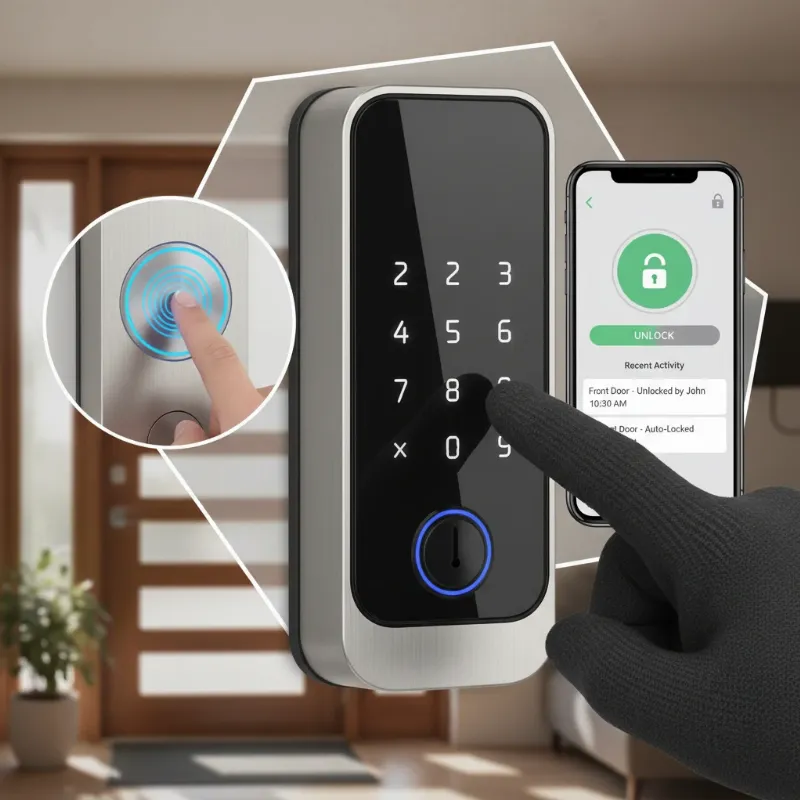 A collage showcasing various smart lock features like keypads, fingerprint scanners, and a smartphone app interface for remote control, emphasizing the technological advantages for a smart home.
Installation and Maintenance Tips for Smart Locks
Proper installation and ongoing maintenance are crucial for the optimal performance and longevity of any smart lock, whether it’s an integrated system or a deadbolt-only model. Taking these steps ensures your smart lock remains a reliable guardian of your home.
Battery Management: Smart locks are primarily battery-powered, and consistent power is key to their functionality. Most smart locks will provide low-battery alerts on the device itself and through a connected app, giving you ample time to replace them. It’s a good practice to proactively replace batteries every 6-8 months, or as recommended by the manufacturer, to avoid unexpected lockouts. Keep spare batteries on hand for convenience.
Software Updates: Just like your smartphone, smart locks run on software that requires periodic updates. These updates often include security patches, bug fixes, and new features. Regularly checking for and installing firmware updates is vital to protect your lock from potential vulnerabilities and ensure it operates with the latest enhancements. Enable automatic updates if available.
Regular Cleaning: Dust, grime, and environmental factors can affect the performance of your smart lock, especially keypads and fingerprint sensors. Gently clean the exterior of your lock with a soft, dry cloth. Avoid abrasive cleaners or excessive moisture, which can damage electronic components. For mechanical parts, a light lubrication with a graphite-based lubricant (avoiding oil-based sprays which can attract dust) can keep the bolt mechanism moving smoothly.
Professional Installation vs. DIY: Many smart locks are designed for straightforward DIY installation, requiring only a screwdriver and minimal time. Manufacturers often provide detailed guides and video tutorials. However, if you’re uncomfortable with the process, or if your door requires modifications, consider hiring a professional locksmith. They can ensure proper alignment, secure installation, and optimal performance, especially for integrated systems that involve more components. A correctly installed lock is the first line of defense for your home.
Common Issues and Troubleshooting
Even with advanced technology, smart locks can encounter occasional issues. Knowing how to troubleshoot common problems can save you time and frustration.
Battery Depletion: This is perhaps the most frequent issue. If your lock stops responding, check the battery level immediately. Most smart locks include a manual key override for emergencies, so always keep a physical key in a safe, accessible place outside your home. Some locks also feature temporary power options, like a 9V battery terminal, to provide enough juice for a single entry.
Connectivity Problems: If your smart lock isn’t communicating with your app or smart home hub, check your home’s Wi-Fi network and Bluetooth connection. Ensure the lock is within range of your router or hub. A simple reboot of your Wi-Fi router or the smart lock itself (by temporarily removing batteries) can often resolve minor connectivity glitches. Verify that your smart home hub is online and properly configured.
Mechanical Jams: While rare in well-maintained locks, mechanical issues can occur. If the bolt isn’t extending or retracting smoothly, inspect the strike plate on the door frame. Misalignment can prevent the deadbolt from engaging correctly. Minor adjustments to the strike plate or door hinges might be necessary. Avoid forcing the lock, as this can cause further damage. If the issue persists, a professional locksmith can diagnose and repair mechanical problems.
Security Vulnerabilities (Software): As connected devices, smart locks can theoretically be vulnerable to hacking attempts. This risk is generally low with reputable brands that prioritize security through encryption and regular software updates. To mitigate this, always purchase locks from trusted manufacturers, keep your firmware updated, use strong, unique passwords for your associated apps and Wi-Fi networks, and enable two-factor authentication if available. Regularly check your smart lock’s activity logs for any unauthorized access attempts.
Future Trends in Smart Lock Technology
The smart lock market is continuously innovating, promising even more sophisticated and seamless security solutions for the future. We’re on the cusp of truly transformative advancements.
One significant trend is the deeper integration of Artificial Intelligence (AI). AI will enable smart locks to learn user patterns, predict potential security threats, and even differentiate between authorized and unauthorized access attempts with greater precision. This could lead to more intelligent anomaly detection and proactive security responses.
Expect to see advanced biometric authentication becoming standard. While fingerprint scanning is common now, future locks will likely feature more sophisticated facial recognition that works effortlessly in various lighting conditions, or even iris scanning for enhanced security and convenience.
Connectivity will also evolve, with locks leveraging new protocols for faster, more reliable, and energy-efficient connections to other smart home devices. This will foster truly interconnected smart home ecosystems where your lock communicates seamlessly with your security cameras, lighting, and HVAC systems. We may also see the wider adoption of blockchain technology to create immutable records of access, significantly boosting transparency and security against tampering.
Finally, new features like voice recognition for authentication, gesture-based unlocking, and self-charging mechanisms (e.g., solar or kinetic energy harvesting) are on the horizon, promising a future where accessing and securing your home is more effortless and secure than ever before.
“A smart lock isn’t just a gadget; it’s a vital component of a comprehensive smart home security ecosystem, continuously evolving to offer peace of mind and unparalleled convenience.” – Anna Chen, Smart Home Security Analyst
Conclusion
Choosing between a smart lock with a handle and a smart deadbolt only ultimately comes down to your personal preferences, budget, and desired level of integration. Both offer a significant upgrade in convenience and security compared to traditional locks. The integrated smart lock with a handle provides a unified aesthetic and often a more comprehensive smart experience, while the smart deadbolt only offers a more flexible, often more affordable, upgrade path that allows you to retain your existing handle.
Consider your priorities: Do you value a seamless, all-in-one look and control, or do you prefer to upgrade just the deadbolt while keeping your current handle? Evaluate your security needs, daily routines, door compatibility, and how the lock will fit into your broader smart home strategy. Whichever you choose, investing in a high-quality smart lock ensures your home is protected with cutting-edge technology, offering peace of mind and modern convenience.
Ready to secure your home with intelligence? Visit SmartLocksPro.com to explore our extensive range of smart locks and find the perfect solution for your entryway today!
Frequently Asked Questions
Are smart locks with handles generally more secure than smart deadbolts only?
No, not inherently. The security of a smart lock, whether integrated with a handle or a deadbolt only, primarily depends on its build quality, security grading (e.g., BHMA ratings), and digital encryption features, rather than its form factor. Both types can offer high levels of physical and digital security.
Can I install a smart lock with a handle myself, or do I need a professional?
Many smart locks, including some integrated handle models, are designed for DIY installation. However, integrated systems can sometimes be more involved than deadbolt-only replacements due to more components. If you’re unsure or encounter any difficulties, consulting a professional locksmith is always recommended to ensure proper and secure installation.
What happens if the batteries die in my smart lock with a handle?
Most smart locks, whether integrated or deadbolt-only, come with a manual key override. They also typically provide low-battery warnings well in advance. Always keep a physical backup key in a safe, accessible location. Some models may also offer a temporary power input for emergency use.
