Let’s be honest, the traditional lock and key has had a good run. But we live in a different world now. Juggling keys, worrying if you locked the door, or figuring out how to let the dog walker in while you’re at work—these are modern-day headaches. What if you could manage all of that and more, right from your phone? That’s precisely where a Smart Lock With Family Management App comes in, changing the game for home security and convenience. It’s not just about a keyless future; it’s about giving you intelligent, flexible control over the most important door in your life.
What Exactly Is a Smart Lock with Family Management App?
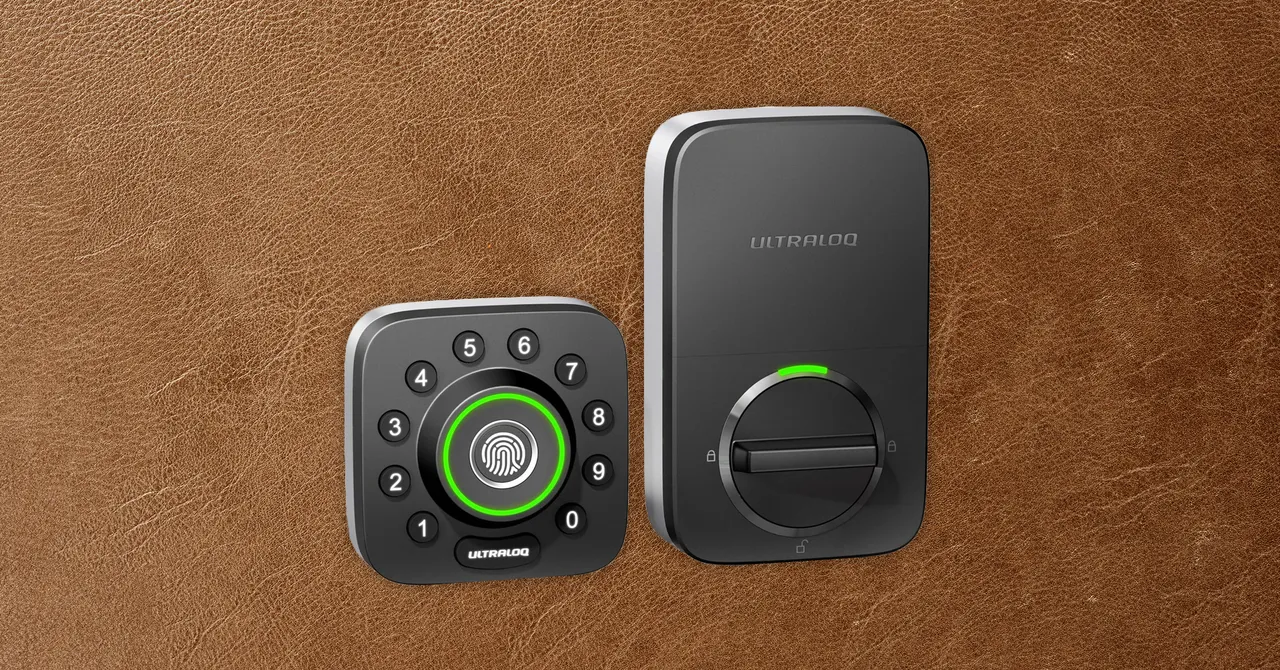
Think of it as two parts working in perfect harmony. First, you have the physical smart lock—a robust, high-tech deadbolt that replaces your old one. But the real magic lies in the second part: the sophisticated mobile application. This app is your command center. A smart lock with family management app transforms a simple entry point into a dynamic access control system, allowing you to decide who can enter your home, when they can enter, and how they can enter, all without a single physical key.
How Does This Technology Actually Work?
It might sound like something out of a sci-fi movie, but the technology is surprisingly straightforward and built on principles you already use every day. Let’s break it down.
The Lock Itself: The Deadbolt Reinvented
At its core, a smart lock is still a lock. The best ones are built with heavy-duty materials like hardened steel and often carry an ANSI/BHMA grade, which is a rating for security and durability. The difference is the motor and the electronics inside. Instead of a key turning pins, a small, secure motor retracts and extends the deadbolt based on a digital command.
The Brains of the Operation: Connectivity
This is how your phone “talks” to your lock. There are two main flavors:
- Bluetooth: This works when your phone is in close range (usually about 30-40 feet). It’s great for auto-unlocking as you approach the door, hands full of groceries. It’s also very power-efficient.
- Wi-Fi: This connects your lock directly to your home’s internet router. The benefit? True remote access. You can lock or unlock your door from anywhere in the world with an internet connection. Many locks use a combination, with a Wi-Fi bridge or hub that communicates with the lock via Bluetooth, saving the lock’s battery life.
The App: Your Digital Keychain and Command Center
This is the heart of family management. The app is where you’ll create and manage digital “keys.” Instead of giving your son a metal key he’s bound to lose, you grant him access through the app on his phone or assign him a unique entry code. You can do the same for your partner, your parents, or a trusted neighbor. The level of control is what makes it so powerful.
The Core Benefits: More Than Just Ditching Your Keys
Upgrading to a smart lock with family management app isn’t just a cool tech move; it delivers real-world benefits that simplify your life and bolster your home’s security.
- Unmatched Convenience: Picture this: you’re pulling into the driveway in a downpour. Instead of fumbling for keys, your door unlocks automatically as you approach. That’s the beauty of features like geofencing.
- Enhanced Security: Lost keys are a massive security risk. You never know who might find them. With a smart lock, you can instantly revoke a digital key or delete an entry code from your app if a phone is lost or you no longer need to grant someone access.
- Total Control for Your Family and Guests: This is the “family management” superpower.
- Permanent Access: For family members who live with you.
- Recurring Access: Perfect for the weekly house cleaner or dog walker. You can set their code to only work on Tuesdays between 10 AM and 12 PM.
- Temporary Access: Ideal for a friend staying the weekend or a contractor doing repairs. Their access automatically expires when the visit is over.
- Complete Peace of Mind: The app keeps a detailed activity log. You can see exactly who unlocked the door and when. Did the kids get home from school on time? You’ll get a notification. Did you remember to lock the door before bed? Just check the app.
Key Features to Look For in a Smart Lock with Family Management App
Not all smart locks are created equal. When you’re shopping, keep an eye out for these essential features that make all the difference for a busy family.
- Multiple User Profiles: The ability to create unique profiles and access methods (app access, keypad codes) for each person.
- Customizable Access Schedules: The power to set specific days and times when a user’s code or digital key will be active.
- Real-Time Activity Log: An indispensable feature that provides a timestamped history of every lock and unlock event.
- Remote Locking and Unlocking: A must-have for those “Did I lock the door?” moments or for letting in an unexpected guest when you’re not home.
- Auto-Lock and Auto-Unlock: Auto-lock ensures your door secures itself after a set period, while auto-unlock (geofencing) offers hands-free entry.
- Smart Home Integration: Compatibility with platforms like Amazon Alexa, Google Assistant, or Apple HomeKit allows you to control your lock with your voice (e.g., “Hey Google, lock the front door”).
- Battery Life and Low-Battery Alerts: Most smart locks run on standard batteries. Look for models that last several months and, crucially, send you a notification well before the power runs out.
|
Our Picks for the Best Smartlocks in 2025
As an Amazon Associate, we earn from qualifying purchases.
|
||
| Num | Product | Action |
|---|---|---|
| 1 | Schlage Encode Plus Smart Wi-Fi Lock for Front Door, Keyless Entry Deadbolt, Unlock with Apple Watch, Built-in WiFi and App Control, Easy Install, Alexa & Apple HomeKit Compatible, Matte Black |

|
| 2 | ULTRALOQ U-Bolt Pro WiFi Smart Lock with Door Sensor, 8-in-1 Keyless Entry Door Lock with Fingerprint ID, App Remote Control, Built-in WiFi Keypad Deadbolt, Auto Unlock, IP65 Waterproof, Easy Install |
|
| 3 | Keypad Smart Door Lock with Knob, Yamiry Keyless Entry Digital Lock with Handle, Fingerprint Electronic Knob for Front Door, Generate Passcode Remotely, Easy Installation |
|
| 4 | Keypad & Key Smart Door Lock, 50 User Codes, Waterproof, Auto Lock - Matte Black |
|
| 5 | TEEHO TE001 Keyless Entry Door Lock with Keypad - Smart Deadbolt Lock for Front Door with 2 Keys - Auto Lock - Easy Installation - Matte Black |
|
| 6 | Yale Security Assure Lock 2 Deadbolt, Black Suede Keyed Smart Entry Door Lock with Wi-Fi Connected Keypad for Code Entry and Remote Access, YRD410-WF1-BSP |
|
| 7 | Keyless Entry Fingerprint Smart Lock with Handle & Keypad: Sifely Biometric Digital Electronic Lock with Code, Electric Deadbolt Door Knob for Front, Interior, Exterior & Bedroom Doors (Silver) |
|
| 8 | Smart Keypad Door Lock with Handle: NICE DIGI Keyless Entry Digital Lock for Front/Interior Door, Electronic Code Knob, Easy Installation |
|
| 9 | Schlage Encode Smart WiFi Deadbolt Lock for Front Door - Keyless Entry with App or Touchscreen - Works with Alexa, Hey Google, & Airbnb - Create Codes for Guests - Satin Nickel Silver |
|
| 10 | Kwikset Powerbolt 250 10-Button Keypad Satin Nickel Transitional Electronic Deadbolt Door Lock, Featuring Convenient Keyless Entry, Customizable User Codes, Auto Locking |
|
How Do You Choose and Install the Right Smart Lock?
Getting started is easier than you think. I remember being a bit intimidated by my first installation, but most are designed for a straightforward DIY process. Here’s a simple path to follow.
1. Check Your Door’s Compatibility
Before you buy anything, take a look at your current door and deadbolt. Is it a standard deadbolt? Is the door properly aligned and easy to close? A smart lock can’t fix a warped door. Most smart locks are designed to fit standard North American doors, but it’s always wise to check the manufacturer’s specifications.
2. Decide on Your Must-Have Features
Think about your family’s routine. Do you need remote access for a vacation rental, or is Bluetooth for your own daily use enough? Do you prefer a keypad for guests, or is app-only access fine? Making a list of your priorities will narrow down the choices significantly.
3. Installation: DIY or Call a Pro?
Honestly, if you can use a screwdriver, you can probably install a smart lock. Most models are designed to replace your existing deadbolt using the same holes. The instructions are typically very clear, and many brands have excellent video tutorials. It usually takes less than 30 minutes.
“People get excited about the app, but forget the lock itself is a physical barrier. Always check the ANSI/BHMA grade. A Grade 1 deadbolt is the gold standard for residential security. A smart brain is useless without a strong body.”
– Dr. Alistair Finch, Home Security Analyst
Integrating Your Smart Lock into a Smarter Home
The real power of smart technology is when devices work together. Integrating your smart lock with family management app into your smart home ecosystem unlocks amazing automations. For instance, you can create a “Welcome Home” routine where unlocking your front door after 6 PM also turns on the hallway lights, adjusts the thermostat, and starts playing your favorite playlist. It’s about making your home more responsive to you and your family’s needs.
Frequently Asked Questions
Q: What happens if the power or Wi-Fi goes out?
A: This is a common and important question! Since the lock itself is battery-powered, it will continue to function. If your Wi-Fi is down, you won’t be able to control it remotely, but you can still use Bluetooth access if you are nearby, the keypad, or a physical key backup if your model includes one.
Q: Is a smart lock secure from hackers?
A: Reputable brands use advanced encryption standards, like 128-bit or 256-bit AES, which is the same level of security used by banks. While no connected device is 100% impenetrable, the security protocols on a high-quality smart lock are extremely robust. Always use a strong, unique password for your account.
Q: How long do the batteries last in a smart lock?
A: Battery life varies by model and usage, but you can typically expect anywhere from 6 to 12 months from a set of standard AA batteries. Every good smart lock with family management app will give you low-battery warnings weeks in advance, so you’ll have plenty of time to change them.
Q: Can I still use a physical key?
A: Many smart lock models include a traditional keyway as a backup for ultimate peace of mind. Some minimalist designs omit it for a sleeker look, so it’s a matter of personal preference.
Q: How difficult is it to grant and revoke access for family or guests?
A: It’s incredibly simple. Through the app, it’s usually as easy as tapping a few buttons. You select a contact, choose the type of access you want to grant (permanent, temporary), and send them an invitation. Revoking access is just as instantaneous.
Your Home, Your Rules
Moving beyond a simple key is about more than just technology; it’s about reclaiming control and gaining peace of mind. A smart lock with family management app puts you in the driver’s seat, allowing you to tailor your home’s security to the dynamic rhythm of your family’s life. It’s the confidence of knowing your home is secure, the convenience of keyless entry, and the control to manage access for everyone you trust, all from the palm of your hand. It’s time to upgrade your door and unlock a smarter, more secure way of living.