Ever had that heart-stopping moment? You’re halfway to work, and the thought hits you like a ton of bricks: “Did I lock the front door?” I’ve been there, fumbling through my day with a nagging sense of unease. For years, the simple metal key has been our first line of defense, but let’s be honest, it’s a bit outdated. In a world of voice assistants and instant everything, a truly modern home deserves a smarter gateway. That’s where a Smart Lock With Alexa Compatibility completely changes the game, turning your front door from a source of anxiety into an intelligent, responsive part of your home.
This isn’t just about a fancy gadget; it’s about reclaiming your peace of mind. Imagine simply asking Alexa to check if your door is locked from the comfort of your bed or locking it with a voice command as you rush out with your hands full. This seamless integration is the future of home security, and we’re here to walk you through everything you need to know. For those curious about the broader trend, understanding the evolution of the smart lock with voice assistant provides a great foundation for what’s possible today.
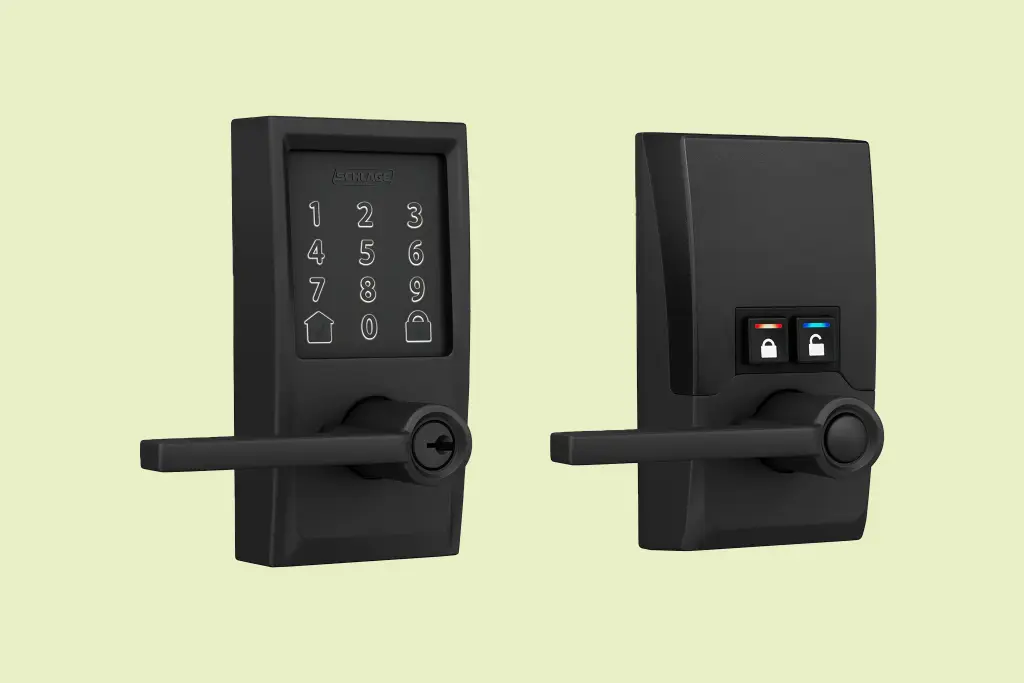
Why is Everyone Talking About Smart Locks?
Before we dive into the specifics of Alexa, let’s pull back the curtain on the technology itself. Smart locks aren’t a new concept, but they’ve evolved dramatically from clunky, keypad-only devices to sleek, interconnected security powerhouses. At their core, they replace your traditional deadbolt’s thumb-turn with a small, motorized mechanism. The “smart” part comes from how you tell that motor what to do.
Early models relied on simple numeric codes. Then came Bluetooth, allowing your phone to act as a key when you were nearby. Now, with Wi-Fi connectivity, your lock is online, giving you control from anywhere in the world. This leap from local convenience to global access is what truly defines the modern smart lock.
How Do These Magical Gadgets Actually Work?
It might seem like magic, but it’s just clever engineering. A smart lock with Alexa compatibility typically uses a combination of technologies to communicate with you and your smart home ecosystem.
- Bluetooth: This is for short-range communication. When your phone is within about 30 feet, the lock can detect it. This is what enables features like “auto-unlock,” where the door senses your approach and unlocks for you. It’s a low-energy solution, which is great for battery life.
- Wi-Fi: This is the bridge to the internet. A built-in Wi-Fi chip or a separate plug-in bridge connects your lock to your home network. This is the key that allows you to lock or unlock your door from your office, the grocery store, or even on vacation. It’s also how Alexa communicates with your lock.
- Z-Wave or Zigbee: These are other low-power wireless protocols often used in smart home devices. They create a “mesh network” where devices can talk to each other. A lock using one of these will need a compatible smart home hub (like Amazon’s Echo Plus or a SmartThings hub) to connect to the internet and, by extension, to Alexa.
The magic happens when you say, “Alexa, lock the front door.” Your Echo device hears the command, sends it over the internet to the Amazon servers, which then securely relay the instruction to your smart lock’s servers, and finally back to the lock itself via your home’s Wi-Fi. The entire process takes just a couple of seconds.
Choosing the Perfect Smart Lock with Alexa Compatibility
Alright, you’re sold on the idea. But with so many options out there, how do you pick the right one? It’s less about finding the “best” lock and more about finding the best lock for you. Here are the key factors to consider.
What Should I Look for Before Buying?
- Installation Type: Do you want a full deadbolt replacement or a simpler “retrofit” model?
- Full Replacement: This involves removing your entire existing deadbolt and replacing it with the new smart lock. It often provides a sleeker, more integrated look.
- Retrofit: This type of lock only replaces the interior thumb-turn portion of your deadbolt. You get to keep your existing keys and the exterior hardware, making installation a breeze.
- Connectivity: Does the lock have built-in Wi-Fi, or does it require a separate bridge? A built-in option is simpler, but a bridge can sometimes offer a more stable connection and better battery life for the lock itself.
- Power Source: Nearly all smart locks run on standard AA or AAA batteries. Look for models that promise 6-12 months of battery life and provide low-battery warnings well in advance, both on the device and through the app.
- Security Grade (ANSI/BHMA): The American National Standards Institute (ANSI) and Builders Hardware Manufacturers Association (BHMA) grade locks on security, durability, and finish. Look for a Grade 1 or Grade 2 rating for the best residential security.
As home security expert Dr. Alistair Finch notes, “A common mistake is focusing solely on the digital encryption while ignoring the physical strength of the lock. A truly secure smart lock is a fortress both digitally and mechanically. Never compromise on the build quality.”
|
Our Picks for the Best Smartlocks in 2025
As an Amazon Associate, we earn from qualifying purchases.
|
||
| Num | Product | Action |
|---|---|---|
| 1 | Schlage Encode Plus Smart Wi-Fi Lock for Front Door, Keyless Entry Deadbolt, Unlock with Apple Watch, Built-in WiFi and App Control, Easy Install, Alexa & Apple HomeKit Compatible, Matte Black |

|
| 2 | Schlage Encode Smart WiFi Deadbolt Lock for Front Door - Keyless Entry with App or Touchscreen - Works with Alexa, Hey Google, & Airbnb - Create Codes for Guests - Satin Nickel Silver |
|
| 3 | Smart Keypad Door Lock with Handle: NICE DIGI Keyless Entry Digital Lock for Front/Interior Door, Electronic Code Knob, Easy Installation |
|
| 4 | Kwikset Powerbolt 250 10-Button Keypad Satin Nickel Transitional Electronic Deadbolt Door Lock, Featuring Convenient Keyless Entry, Customizable User Codes, Auto Locking |
|
| 5 | Keypad & Key Smart Door Lock, 50 User Codes, Waterproof, Auto Lock - Matte Black |
|
| 6 | ULTRALOQ U-Bolt Pro WiFi Smart Lock with Door Sensor, 8-in-1 Keyless Entry Door Lock with Fingerprint ID, App Remote Control, Built-in WiFi Keypad Deadbolt, Auto Unlock, IP65 Waterproof, Easy Install |
|
| 7 | Yale Security Assure Lock 2 Deadbolt, Black Suede Keyed Smart Entry Door Lock with Wi-Fi Connected Keypad for Code Entry and Remote Access, YRD410-WF1-BSP |
|
| 8 | Keyless Entry Fingerprint Smart Lock with Handle & Keypad: Sifely Biometric Digital Electronic Lock with Code, Electric Deadbolt Door Knob for Front, Interior, Exterior & Bedroom Doors (Silver) |
|
| 9 | Keypad Smart Door Lock with Knob, Yamiry Keyless Entry Digital Lock with Handle, Fingerprint Electronic Knob for Front Door, Generate Passcode Remotely, Easy Installation |
|
| 10 | TEEHO TE001 Keyless Entry Door Lock with Keypad - Smart Deadbolt Lock for Front Door with 2 Keys - Auto Lock - Easy Installation - Matte Black |
|
- App and Features: The companion app is your command center. Does it offer features like temporary guest codes, an activity log to see who has come and gone, or auto-locking after a set period? A great app experience is just as important as the hardware.
How to Install Your New Alexa-Powered Smart Lock
Worried you need to be a master locksmith to install one of these? Don’t be. Most smart locks are designed for a straightforward DIY installation with just a Phillips head screwdriver.
- Remove Your Old Deadbolt: Start by unscrewing the interior thumb-turn assembly. Then, remove the two long bolts holding the exterior and interior plates together. Finally, remove the deadbolt itself from the side of the door.
- Install the New Deadbolt: Slide the new smart deadbolt into the side of the door and secure it with the provided screws.
- Mount the Exterior Keypad/Keyhole: Place the exterior portion of the lock, feeding the data cable through the door underneath the deadbolt.
- Attach the Interior Mounting Plate: Secure the mounting plate on the inside of the door with the long bolts, making sure the data cable is safely tucked away.
- Connect and Mount the Interior Assembly: Plug the data cable into the main interior housing. Slide this housing onto the mounting plate and secure it. This is the part that contains the motor and batteries.
- Set Up the App and Connect to Wi-Fi: Follow the manufacturer’s instructions to download the app, create an account, and connect your lock to your home Wi-Fi network.
- Link to Alexa: Open the Amazon Alexa app. Go to “Skills & Games,” search for the skill for your smart lock brand (e.g., August, Schlage, Yale), and enable it. You’ll be prompted to link your accounts. Once linked, Alexa will discover your new device, and you’re ready to go!
Beyond Just Locking and Unlocking: Advanced Features
The real beauty of a smart lock with Alexa compatibility lies in the ecosystem. Locking and unlocking with your voice is just the beginning.
- Alexa Routines: This is where the magic really kicks in. You can create a “Goodnight” routine where a single command—”Alexa, goodnight”—turns off the lights, adjusts the thermostat, and locks your front door. Or a “Goodbye” routine that locks the door and starts your robot vacuum.
- Guest Access: Have a friend or dog walker coming over while you’re out? You can create a temporary or recurring access code for them right from your phone. No more hiding spare keys under the mat.
- Activity Logs: Get a real-time feed of when your door is locked or unlocked, and by whom. It’s an incredible tool for knowing when the kids get home from school or confirming that the cleaner arrived on time.
- Security Updates: Just like your phone or computer, your smart lock needs to stay up-to-date to be secure. Reputable manufacturers regularly push out new firmware to patch vulnerabilities. Keeping your device secure is paramount, which is why understanding the role of smart lock software updates is non-negotiable for any smart homeowner.
While most locks rely on codes or phones, the technology is rapidly evolving. A fascinating development in this space is the smart lock with facial recognition, which offers a glimpse into the future of keyless entry and even greater convenience.
Frequently Asked Questions
Can a smart lock with Alexa compatibility be hacked?
While no internet-connected device is 100% unhackable, reputable smart locks use robust, bank-level AES 128-bit or 256-bit encryption. The risk is extremely low, especially if you use a strong, unique password for your account and enable two-factor authentication.
What happens if the power or Wi-Fi goes out?
Your smart lock will still function. Since it’s battery-powered, a power outage won’t affect it. If the Wi-Fi goes down, you’ll lose remote access and Alexa control, but you can still operate it via Bluetooth with your phone or simply by using the physical key, which should always be kept as a backup.
Do I still need my physical key?
Yes! It is always recommended to carry a physical key with you as a failsafe backup. Whether the batteries die unexpectedly or there’s a technical glitch, having that key ensures you’ll never be locked out.
How long do the batteries typically last?
This varies by model and usage, but most smart locks get between 6 to 12 months on a single set of AA batteries. All good models will give you ample warning via the app and often with an audible or visual cue on the lock itself when the batteries are running low.
Can I use Alexa to unlock my door with my voice?
Yes, but with an extra layer of security. For safety reasons, Alexa requires you to set up a 4-digit voice PIN code. When you ask Alexa to unlock the door, she will prompt you for this code before executing the command. This prevents an unauthorized person from simply yelling through a window to unlock your door.
The Final Turn: Is It Time to Upgrade?
Moving from a traditional lock to a smart lock with Alexa compatibility is more than just a tech upgrade; it’s a lifestyle enhancement. It’s about eliminating one of life’s little anxieties and replacing it with confidence and control. It’s the convenience of letting a guest in from miles away, the security of checking your door’s status from your bed, and the simple joy of a home that works for you. By choosing the right device and integrating it into your smart home, you’re not just buying a new lock—you’re investing in peace of mind. The future of home security is keyless, connected, and smarter than ever, and making the switch is one of the most practical and rewarding upgrades you can make to your home.