Ever had that sinking feeling halfway to work? Did I lock the front door? We’ve all been there. Fumbling for keys in the pouring rain, trying to juggle groceries, a squirming toddler, and a stubborn deadbolt. For generations, the simple metal key has been our gatekeeper. But in an age where our phones can manage everything from our finances to our thermostat, it’s only natural that our door locks are getting a serious IQ boost. This brings us to the big question on every homeowner’s mind: what are the real Smart Lock Pros And Cons? Let’s unlock the truth together.
The Evolution of Home Security
Before we dive into the nitty-gritty, it helps to understand that smart locks aren’t some futuristic fantasy. They’re the next logical step in a long history of home security. From simple wooden bars to intricate pin-tumbler locks, we’ve always sought better ways to protect our homes. Smart locks simply trade mechanical complexity for digital intelligence, using technologies like Bluetooth, Wi-Fi, and biometrics to offer a level of control and convenience that was once science fiction.
For those concerned about the digital side of this evolution, it’s worth noting that the principles are similar. Just as a physical key has a unique pattern, a digital key uses advanced encryption. To understand more about the layers of protection involved, exploring the fundamentals of smart lock cloud security can provide a deeper insight into how your data is kept safe.
The Bright Side: Unpacking the Pros of a Smart Lock
So, what’s all the hype about? When you switch to a smart lock, you’re not just getting a new piece of hardware; you’re upgrading your lifestyle.
Unmatched Convenience: The End of the Key Fumble
This is the number one reason most people make the switch. Imagine this:
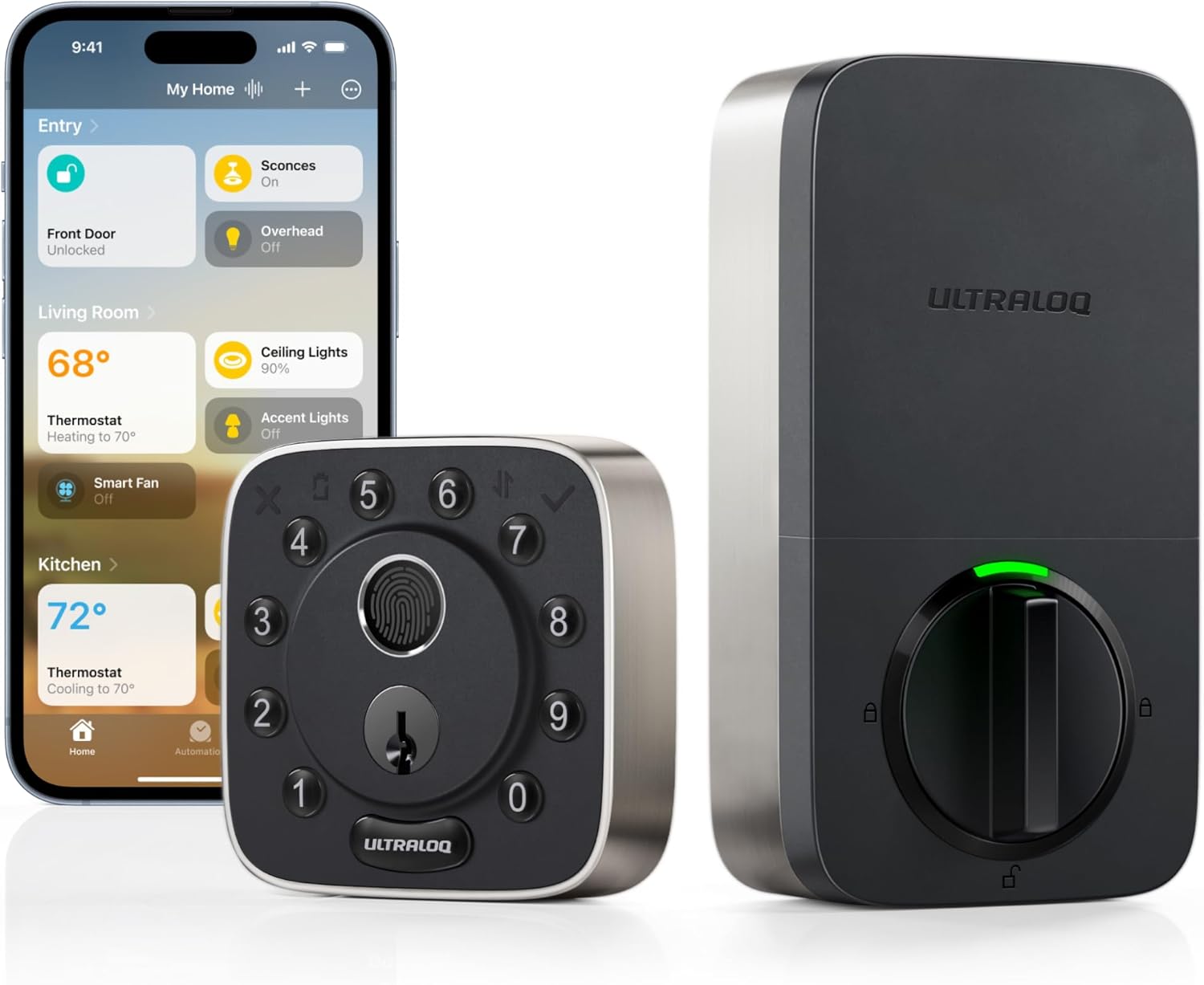
- Keyless Entry: Your hands are full of shopping bags. Instead of the awkward pocket-patting dance, you simply tap a code on a keypad, use your fingerprint, or have the door unlock automatically as your phone approaches. It’s a small change that feels like a huge win every single day.
- Granting Remote Access: The dog walker is coming at noon, but you’re stuck in a meeting. No problem. With a few taps on your smartphone, you can unlock the door for them from anywhere in the world. The same goes for letting in a trusted contractor, a family member, or a delivery person.
- Temporary “Keys”: Have guests staying for the weekend? Instead of handing out a physical key they might lose, you can create a temporary access code that only works for the duration of their stay. Once they leave, the code expires. Total control, zero hassle.
Enhanced Security and Control: Your Home’s Digital Bouncer
It might seem counterintuitive that something “hackable” could be more secure, but in many ways, it is.
- Activity Logs: Want to know when the kids got home from school? Your smart lock app can tell you. Most models keep a detailed log of every time the door is locked or unlocked, and by whom. This gives you incredible peace of mind.
- No More Lost Keys: A lost or stolen key is a major security risk, often forcing you to rekey all your locks. With a smart lock, if a phone is lost or you suspect a code has been compromised, you can revoke access instantly.
- Auto-Locking: This is my personal favorite. You can set your door to automatically lock after a set period, like 30 seconds or a minute. That “Did I lock the door?” anxiety? Gone for good.
As high-tech locksmith David Chen often says, “The biggest vulnerability in home security isn’t the lock; it’s human error. Smart locks help eliminate that by automating the simple act of securing your door.”
Seamless Smart Home Integration
If you’re already invested in a smart home ecosystem, a smart lock is the missing piece of the puzzle. You can create powerful routines:
- “Goodnight” Scene: Tell your smart speaker “Goodnight,” and it can turn off the lights, adjust the thermostat, and lock your front door simultaneously.
- “Welcome Home” Scene: As you approach your house, your GPS can trigger the door to unlock, the entryway lights to turn on, and your favorite playlist to start.
- Voice Commands: Simply ask Google Assistant or Alexa to check if the front door is locked without ever leaving the couch.
The Other Side of the Coin: Weighing the Smart Lock Cons
Of course, it’s not all sunshine and rainbows. To give you a balanced view of the smart lock pros and cons, we have to look at the potential downsides.
The Price Tag: A Premium on Convenience
Let’s be blunt: a quality smart lock costs significantly more than a standard deadbolt. You’re not just paying for the locking mechanism; you’re paying for the software, the connectivity, and the technology packed inside. The initial investment can be a barrier for some.
The Tech Factor: Installation and Reliance on Power
- Installation: While many smart locks are designed for easy DIY installation (often in under 30 minutes with just a screwdriver), it can still be intimidating for the less tech-savvy. You need to ensure it’s compatible with your door and installed correctly to function properly.
- Battery Life: Smart locks run on batteries. While they typically last for many months, they will eventually need to be replaced. Most locks give you plenty of warning, but it’s one more maintenance task to add to your list.
- Power and Wi-Fi Outages: What happens if the power or internet goes out? This is a huge concern for many. The good news is that most smart locks are designed with this in mind. Bluetooth and keypad models will continue to work fine, as they don’t rely on your home’s Wi-Fi. And virtually all smart locks come with a physical key override as a final backup.
Security and Hacking Concerns
The idea of someone hacking your door lock is terrifying. While no system is 100% impenetrable, reputable smart lock brands use robust security measures, such as AES 256-bit encryption, which is the same standard used by banks and governments. The risk of a brute-force digital attack is often far lower than the risk of someone picking a traditional lock or simply finding a spare key under the doormat. The key is choosing a trusted brand that regularly updates its firmware to patch any potential vulnerabilities.
|
Our Picks for the Best Smartlocks in 2025
As an Amazon Associate, we earn from qualifying purchases.
|
||
| Num | Product | Action |
|---|---|---|
| 1 | Schlage Encode Plus Smart Wi-Fi Lock for Front Door, Keyless Entry Deadbolt, Unlock with Apple Watch, Built-in WiFi and App Control, Easy Install, Alexa & Apple HomeKit Compatible, Matte Black |

|
| 2 | TEEHO TE001 Keyless Entry Door Lock with Keypad - Smart Deadbolt Lock for Front Door with 2 Keys - Auto Lock - Easy Installation - Matte Black |
|
| 3 | Smart Keypad Door Lock with Handle: NICE DIGI Keyless Entry Digital Lock for Front/Interior Door, Electronic Code Knob, Easy Installation |
|
| 4 | Yale Security Assure Lock 2 Deadbolt, Black Suede Keyed Smart Entry Door Lock with Wi-Fi Connected Keypad for Code Entry and Remote Access, YRD410-WF1-BSP |
|
| 5 | Kwikset Powerbolt 250 10-Button Keypad Satin Nickel Transitional Electronic Deadbolt Door Lock, Featuring Convenient Keyless Entry, Customizable User Codes, Auto Locking |
|
| 6 | Keypad Smart Door Lock with Knob, Yamiry Keyless Entry Digital Lock with Handle, Fingerprint Electronic Knob for Front Door, Generate Passcode Remotely, Easy Installation |
|
| 7 | Keypad & Key Smart Door Lock, 50 User Codes, Waterproof, Auto Lock - Matte Black |
|
| 8 | Keyless Entry Fingerprint Smart Lock with Handle & Keypad: Sifely Biometric Digital Electronic Lock with Code, Electric Deadbolt Door Knob for Front, Interior, Exterior & Bedroom Doors (Silver) |
|
| 9 | ULTRALOQ U-Bolt Pro WiFi Smart Lock with Door Sensor, 8-in-1 Keyless Entry Door Lock with Fingerprint ID, App Remote Control, Built-in WiFi Keypad Deadbolt, Auto Unlock, IP65 Waterproof, Easy Install |
|
| 10 | Schlage Encode Smart WiFi Deadbolt Lock for Front Door - Keyless Entry with App or Touchscreen - Works with Alexa, Hey Google, & Airbnb - Create Codes for Guests - Satin Nickel Silver |
|
How Do I Choose the Right Smart Lock?
Feeling overwhelmed by the options? Let’s simplify it. When choosing a smart lock, consider these key features:
- Access Method: How do you want to unlock your door?
- Keypad: Great for kids or guests without a smartphone.
- Biometric (Fingerprint): The fastest and most secure personal access.
- Bluetooth (Proximity): Unlocks automatically when your phone is near.
- Wi-Fi (Remote): Allows you to control the lock from anywhere.
- Power Source: Most use standard AA batteries. Check the estimated battery life.
- Smart Home Compatibility: Does it work with Alexa, Google Home, or Apple HomeKit? If you use one of these systems, compatibility is a must.
- Physical Key Backup: For ultimate peace of mind, ensure the model you choose has a traditional keyhole as a failsafe.
- Installation: Is it a full deadbolt replacement or a retrofit model that only replaces the interior thumb-turn? Retrofit models are often easier to install and allow you to keep your existing keys.
Frequently Asked Questions About Smart Locks
What happens if my Wi-Fi goes down?
If your smart lock uses Wi-Fi for remote access, that feature won’t work. However, other access methods like the keypad, Bluetooth connectivity, and the physical key will continue to function normally, so you’ll never be locked out.
How long do smart lock batteries last?
This varies by model and usage, but most smart locks provide 6 to 12 months of battery life on a single set of AA batteries. Your smart lock app will notify you weeks in advance when the batteries are running low.
Are smart locks safe from hackers?
Reputable brands invest heavily in security, using advanced encryption to protect the connection between your phone and the lock. While no device is un-hackable, the risk is extremely low and often less than the risk associated with physical keys.
Can I still use a physical key with a smart lock?
Yes, the vast majority of smart locks on the market include a traditional keyway as a backup. This ensures you can always get into your home, even if the batteries die completely or there’s a technical malfunction.
Is professional installation necessary for a smart lock?
For most models, no. They are designed to be DIY-friendly and typically only require a Phillips head screwdriver. If you’re replacing a standard deadbolt, the process is usually straightforward. However, if you’re not comfortable with the task, a locksmith can certainly install it for you.
The Final Verdict: Are Smart Locks a Smart Move?
After weighing the smart lock pros and cons, the answer for most modern homeowners is a resounding yes. While the initial cost and reliance on technology are valid considerations, the immense benefits in convenience, control, and day-to-day peace of mind are transformative. You’re not just buying a lock; you’re buying a smarter, more secure, and less stressful way to manage access to your home. The future isn’t just knocking; it’s asking for a temporary access code.