Ever found yourself in a key-juggling nightmare? You’ve got a key for the dog walker, a spare hidden under a (not-so-secret) rock for your in-laws, and another one you lent to a neighbor that you think you got back. It’s a messy, insecure system from a bygone era. The good news is, managing access to your home has evolved. With a Smart Lock Multiple User Codes system, you can finally ditch the metal and embrace intelligent, controlled access for everyone you trust. It’s not just about convenience; it’s about taking back control of your front door.
What Exactly Are Smart Lock Multiple User Codes?
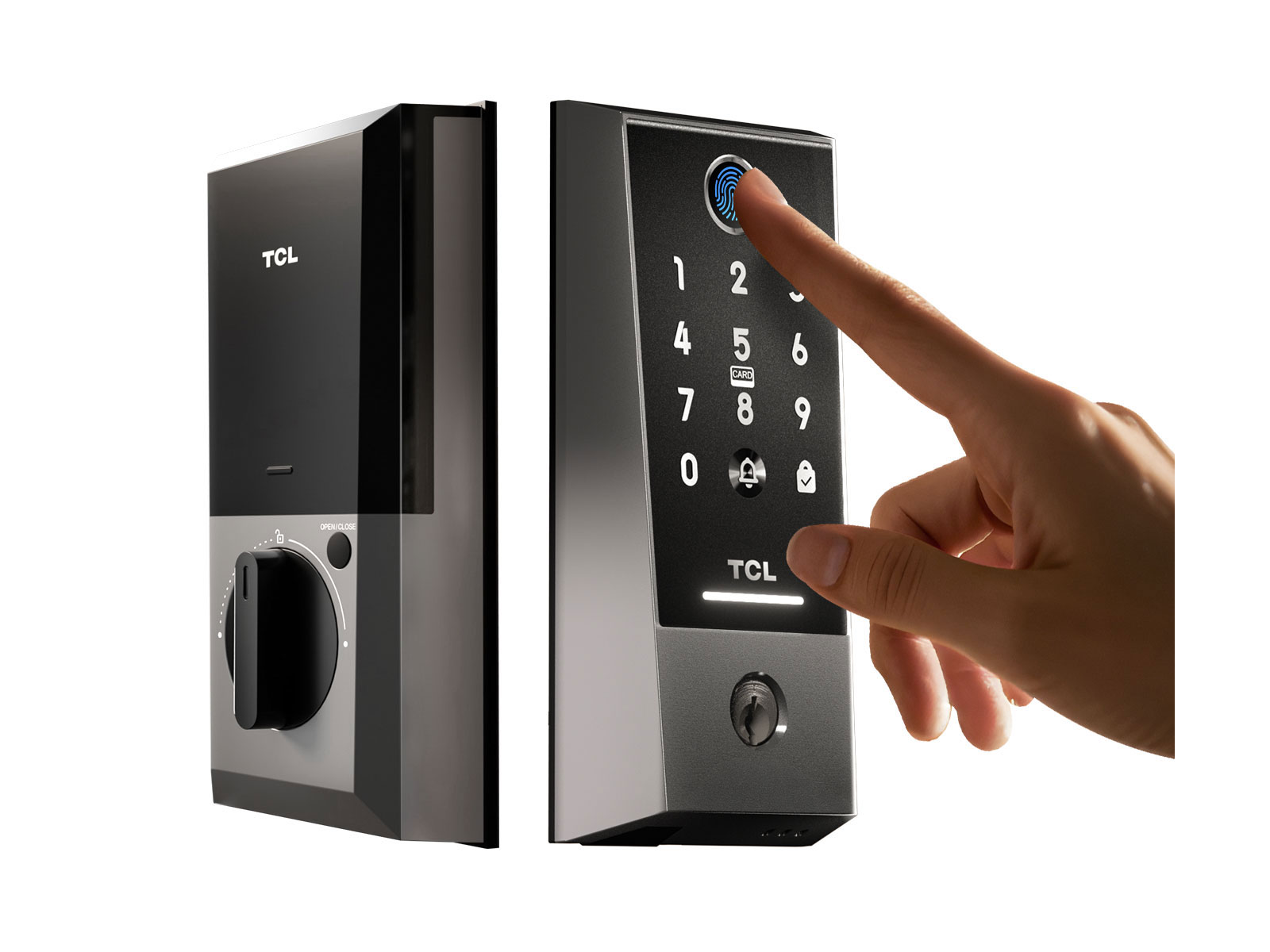
Let’s break it down. At its core, a smart lock is a keyless entry device for your door. The feature of smart lock multiple user codes is the brain behind the operation. Instead of one single code for everyone, it allows you to create and assign unique, individual PIN codes for different people.
Think of it like having digital keys. Your son has his own key (code), the weekly cleaner has hers, and a visiting friend can have one that only works for a weekend. You are the master administrator, with the power to create, customize, and delete these codes instantly from your smartphone, wherever you are. This simple yet powerful feature transforms your front door from a simple barrier into an intelligent access point.
Why You Need to Ditch the Single Code Mentality
I remember the early days of digital locks where you had one code. If you needed to give it to a contractor, you’d have to share the family code. Once the job was done, you’d have to change the code and re-teach it to the whole family. It was clunky and, frankly, not very secure. A smart lock multiple user codes system solves this beautifully.
Here’s why it’s a game-changer for modern households:
- Enhanced Security: If you need to revoke access for a former employee or a service provider, you don’t have to change the master code. You simply delete their specific user code. This eliminates the risk of old keys or shared codes floating around.
- Complete Control & Visibility: Most smart lock apps provide an activity log. You can see exactly which code was used and at what time. You’ll know when your kids got home from school or if the plumber arrived on schedule. It’s peace of mind in your pocket.
- Unmatched Convenience: No more rushing home to let someone in. You can create a code from your office desk and send it via text. This is perfect for unexpected guests, deliveries, or emergency access for a neighbor.
- Perfect for Rentals and Guests: If you run an Airbnb or frequently have guests, this feature is non-negotiable. You can create a code that is only active for the duration of their stay, automatically expiring upon checkout.
Security Pro Tip: Never use easily guessable codes like “1234,” “1111,” or your street number. A good smart lock will have features to prevent brute-force attacks by temporarily locking the keypad after too many failed attempts.
The Different Types of User Codes You Should Know
The real power of a smart lock multiple user codes system lies in its flexibility. Not all codes are created equal, and you can tailor them to specific needs.
Permanent Codes
This is the code for the inner circle—your family members and trusted residents. It’s the digital equivalent of their own house key. It works 24/7 with no expiration date, giving them unrestricted access.
Temporary & One-Time Codes
Have a contractor coming on Tuesday to fix the sink? Or a friend stopping by to water your plants while you’re on vacation? A temporary code is your best friend. You can set it to be active for a few hours, a few days, or just for a single use. After it’s used or the time window expires, the code becomes inactive.
Scheduled or Recurring Codes
This is brilliant for people who need regular access to your home on a predictable schedule.
- The Housekeeper: Set a code that only works on Mondays between 9 AM and 12 PM.
- The Dog Walker: Create a code that is active every weekday from 1 PM to 2 PM.
If they try to use the code outside of these specific times, the door won’t unlock. This level of granular control ensures people only have access precisely when they’re supposed to.
How to Choose a Lock with the Best Multiple User Code Features
Not all smart locks handle user codes the same way. When you’re shopping, the ability to manage a smart lock multiple user codes should be a top priority. Here’s a quick checklist to guide you.
- Number of Codes Supported: Check the maximum number of user codes the lock can store. A basic model might offer 10-20, while more advanced ones can store 100 or more. For most families, 30 is a great starting point.
- Ease of Management: A user-friendly app is crucial. How easy is it to add a new user, set a schedule, or delete a code? The best apps, like the one from Smartlocks Pro, make this process intuitive and fast.
- Types of Codes Offered: Does the lock support all the main types—permanent, temporary, and scheduled? Don’t settle for a lock that only offers one or two.
- Notification System: A good system will send you real-time alerts on your phone, letting you know when a specific code is used. This closes the loop and gives you total awareness.
- Security Encryption: Ensure the communication between your phone, the lock, and the cloud is protected with at least AES 128-bit encryption. This is the industry standard for securing data.
According to David Chen, a high-tech locksmith and smart home security consultant, “A common mistake is focusing only on the wireless connection and forgetting about the software. The flexibility and security of the code management system are what truly define a great smart lock experience. It’s the difference between a simple gadget and a real security solution.”
|
Our Picks for the Best Smartlocks in 2026
As an Amazon Associate I earn from qualifying purchases.
|
||
| Num | Product | Action |
|---|---|---|
| 1 | Keypad & Key Smart Door Lock, 50 User Codes, Waterproof, Auto Lock - Matte Black |

|
| 2 | Keypad Smart Door Lock with Knob, Yamiry Keyless Entry Digital Lock with Handle, Fingerprint Electronic Knob for Front Door, Generate Passcode Remotely, Easy Installation |
|
| 3 | Keyless Entry Fingerprint Smart Lock with Handle & Keypad: Sifely Biometric Digital Electronic Lock with Code, Electric Deadbolt Door Knob for Front, Interior, Exterior & Bedroom Doors (Silver) |
|
| 4 | Kwikset Powerbolt 250 10-Button Keypad Satin Nickel Transitional Electronic Deadbolt Door Lock, Featuring Convenient Keyless Entry, Customizable User Codes, Auto Locking |
|
| 5 | Schlage Encode Plus Smart Wi-Fi Lock for Front Door, Keyless Entry Deadbolt, Unlock with Apple Watch, Built-in WiFi and App Control, Easy Install, Alexa & Apple HomeKit Compatible, Matte Black |
|
| 6 | ULTRALOQ U-Bolt Pro WiFi Smart Lock with Door Sensor, 8-in-1 Keyless Entry Door Lock with Fingerprint ID, App Remote Control, Built-in WiFi Keypad Deadbolt, Auto Unlock, IP65 Waterproof, Easy Install |
|
| 7 | TEEHO TE001 Keyless Entry Door Lock with Keypad - Smart Deadbolt Lock for Front Door with 2 Keys - Auto Lock - Easy Installation - Matte Black |
|
| 8 | Schlage Encode Smart WiFi Deadbolt Lock for Front Door - Keyless Entry with App or Touchscreen - Works with Alexa, Hey Google, & Airbnb - Create Codes for Guests - Satin Nickel Silver |
|
| 9 | Yale Security Assure Lock 2 Deadbolt, Black Suede Keyed Smart Entry Door Lock with Wi-Fi Connected Keypad for Code Entry and Remote Access, YRD410-WF1-BSP |
|
| 10 | Smart Keypad Door Lock with Handle: NICE DIGI Keyless Entry Digital Lock for Front/Interior Door, Electronic Code Knob, Easy Installation |
|
Beyond Codes: Integrating Your Smart Lock into a Smarter Home
The magic really happens when your smart lock multiple user codes system starts talking to your other smart devices. Integration with platforms like Google Home, Amazon Alexa, and Apple HomeKit opens up a world of possibilities.
Imagine this:
- When your child uses their code to enter, the smart home system automatically turns on the hallway lights, adjusts the thermostat to their preferred temperature, and sends you a “Welcome Home” notification.
- When the “Housekeeper” code is used, it could disarm a specific part of your security system for the duration of their visit.
- You can use voice commands like, “Hey Google, is the front door locked?” or “Alexa, create a guest code for the front door.”
This level of automation isn’t science fiction anymore. It’s about creating a home that is not just secure, but also responsive and intelligent.
Frequently Asked Questions (FAQ)
Q: How many user codes can a smart lock typically store?
A: This varies by brand and model. Entry-level smart locks may store between 10 to 30 unique codes, while more advanced or commercially-oriented models can store over 100. Always check the product specifications before buying.
Q: Can I see a history of who used a code and when?
A: Yes, this is a standard and essential feature. Most smart lock apps provide a detailed activity log or event history, showing which user code was entered and the exact time of the event, giving you a complete audit trail.
Q: Is it easy to add or delete a user code if someone no longer needs access?
A: Absolutely. With a quality smart lock, you can instantly add or revoke a code from anywhere using the companion smartphone app. The change is typically pushed to the lock in real-time, ensuring immediate effect.
Q: What happens if someone tries to guess a code and enters it incorrectly too many times?
A: Good smart locks have a built-in security feature called a keypad lockout or tamper alarm. After a set number of incorrect attempts (usually 3-5), the keypad will temporarily disable itself for a few minutes to prevent brute-force guessing.
Q: Do I need a Wi-Fi connection for the multiple user codes to work?
A: The codes themselves are stored locally on the lock, so they will work even if your Wi-Fi is down. However, you need a Wi-Fi connection (often via a Wi-Fi bridge or hub) to remotely manage the codes, such as adding, deleting, or receiving real-time notifications.
The Final Word on Keyless Freedom
Upgrading to a smart lock isn’t just about getting rid of your keys. It’s about adopting a smarter, more secure, and infinitely more flexible way of managing your home’s security. The smart lock multiple user codes feature is the heart of this revolution. It puts you in the driver’s seat, giving you the power to grant access on your terms—to whomever you want, whenever you want, for as long as you want. It’s time to stop managing keys and start managing access. Your peace of mind is worth it.