The advent of smart lock technology has revolutionized home security and convenience, offering keyless entry, remote access, and integration with smart home systems. However, embracing this modern convenience often introduces a new key into your existing set, which can be cumbersome. Many homeowners prefer a unified key system, desiring their new smart lock to operate with the same physical key as their older, traditional locks. The good news is that for many smart locks, achieving this seamless integration by rekeying to your old keys is entirely possible, enhancing both convenience and maintaining your preferred security setup.
This guide will walk you through the nuances of rekeying your smart lock, detailing the processes for popular brands, discussing crucial compatibility factors, and offering expert advice to ensure a smooth and secure transition to a single-key household.
Understanding Smart Lock Rekeying: Is It Possible?
|
Our Picks for the Best smart locks in 2026
As an Amazon Associate I earn from qualifying purchases.
|
||
| Num | Product | Action |
|---|---|---|
| 1 | TEEHO TE001 Keyless Entry Door Lock with Keypad - Smart Deadbolt Lock for Front Door with 2 Keys - Auto Lock - Easy Installation - Matte Black |

|
| 2 | Tapo Smart Wi-Fi Deadbolt Door Lock – Keyless Tactile Buttons, Customized Access with in-App Monitoring, Auto-Lock, IP54 Weatherproof, BHMA Grade 3, Compatible with Standard Door Sizes, Tapo DL100 |
|
| 3 | Yale Security Assure Lock 2 Deadbolt, Black Suede Keyed Smart Entry Door Lock with Wi-Fi Connected Keypad for Code Entry and Remote Access, YRD410-WF1-BSP |
|
| 4 | Smart Door Lock with Camera Fingerprint Keyless Entry Door Lock Electronic Deadbolt with Keypad Code, App Remote Control, Auto Unlock for Front Door |
|
| 5 | Schlage Encode Smart WiFi Deadbolt Lock for Front Door - Keyless Entry with App or Touchscreen - Works with Alexa, Hey Google, & Airbnb - Create Codes for Guests - Matte Black |
|
| 6 | ULTRALOQ U-Bolt Pro WiFi Smart Lock with Door Sensor, 8-in-1 Keyless Entry Door Lock with Fingerprint ID, App Remote Control, Built-in WiFi Keypad Deadbolt, Auto Unlock, IP65 Waterproof, Easy Install |
|
| 7 | Smart Door Handle Lock with Keypad: Yamiry Fingerprint Smart Knob - Keyless Entry Digital Lock for Front Door - Deadbolt with APP - Generate Passcode Remotely - DIY Installation |
|
| 8 | Schlage Encode Smart WiFi Deadbolt Lock for Front Door - Keyless Entry with App or Touchscreen - Works with Alexa, Hey Google, & Airbnb - Create Codes for Guests - Satin Nickel Silver |
|
| 9 | Wyze Auto-Lock Bolt v2, Fingerprint Keyless Entry Smart Lock, AI Learning Scanner with Wi-Fi Front Door Lock Deadbolt, Auto-Lock, 8 Months Battery, BHMA2, IP53, Anti-Peep Keypad, Backup Keys |
|
| 10 | Wyze Palm Lock, Smart Door Lock with Palm Vein Recognition, Keyless Entry Smart Locks for Front Door, Keypad, Auto Lock, Dual Battery, Wi-Fi, Works with Alexa & Google, BHMA, IP53, Mechanical Key |
|
Rekeying a lock means changing its internal mechanism so that a different key can operate it, while the lock itself remains installed in the door. In the context of smart locks, this primarily refers to modifying the mechanical cylinder that accepts a physical key. This process is distinct from changing digital access codes or managing smartphone app permissions, which are handled electronically. The primary reason homeowners choose to rekey their smart locks is for convenience, consolidating multiple physical keys into a single one for all compatible entry points. It also allows for security continuity, ensuring that a new smart lock fits into an existing master key system or aligns with a preferred key you’ve used for years.
The feasibility of rekeying hinges on one critical factor: your smart lock must possess a physical keyway. Many popular smart locks, even those with advanced electronic features, include a traditional key cylinder as a backup or primary entry method. If your smart lock lacks a physical keyhole, it cannot be rekeyed in the traditional sense to match an existing physical key.
Keyway Compatibility: The First Step to Rekeying Success
Before attempting to rekey any lock, it is paramount to understand keyway compatibility. A keyway refers to the specific shape of the keyhole and the corresponding key blank that fits into it. The two most prevalent residential keyways in North America are Kwikset and Schlage. Keys from one brand are generally incompatible with locks from the other due to their distinct groove patterns.
To verify compatibility, simply try inserting your “old key” (the key you wish your smart lock to match) into the smart lock’s keyway. If the key slides in completely and smoothly without force, it’s likely that the keyways are compatible. If it doesn’t fit, or requires excessive force, the keyways are different, and the smart lock cannot be rekeyed to that particular key. While some lesser-known brands may use keyways compatible with Kwikset or Schlage, it is always safest to rekey within the same manufacturer or a known compatible system to guarantee success.
DIY Rekeying: Kwikset SmartKey Enabled Smart Locks
Kwikset has pioneered a user-friendly rekeying technology called SmartKey Security®, which is integrated into many of their smart lock products, including models like the Kevo, Halo Touch, and SmartCode series. This innovative feature allows homeowners to rekey their locks themselves in a matter of seconds, without disassembling the lock or needing a locksmith.
The Kwikset SmartKey rekeying process is remarkably straightforward, requiring only the existing functional key, the new (old) key you wish to use, and a small SmartKey tool provided with the lock. This tool is essential as it initiates the rekeying sequence. This technology offers a significant advantage for those looking to unify their home’s keying system quickly and efficiently.
Step-by-Step Kwikset SmartKey Rekeying:
- Prepare the Lock: Ensure the smart lock is installed on the door, and the door is open. If it’s a deadbolt, make sure it’s in the locked position. If it’s a knob or lever, confirm it’s also in the locked position.
- Insert Current Key: Insert the key that currently operates your smart lock fully into the keyway. Rotate it 90 degrees clockwise.
- Insert SmartKey Tool: Locate the small, circular SmartKey hole next to the keyway. Insert the SmartKey tool firmly and fully into this hole. You might feel or hear a click as it engages.
- Remove Tool and Key: Without removing the SmartKey tool, remove the current operating key. Then, remove the SmartKey tool.
- Insert New (Old) Key: Fully insert the old key you wish to use with the lock (this is now the “new key” for the lock). Ensure the key is completely seated; the edge of the key should touch the indent in the cylinder face.
- Rotate New Key: Without pushing or pulling the key, rotate it 180 degrees counter-clockwise, then immediately rotate it 180 degrees clockwise.
- Test Key Retention: Gently pull the key to confirm it will not come out in this position. If it comes out, the rekeying process was not successful, and you may need to repeat the steps or consult troubleshooting.
- Final Rotation and Removal: Rotate the key 90 degrees counter-clockwise, returning it to the original starting position. You can now remove your newly programmed key.
- Test Thoroughly: Test the new key multiple times to ensure it locks and unlocks smoothly. Also, confirm that the old key no longer operates the lock.
“Kwikset SmartKey technology allows for unprecedented DIY rekeying ease, empowering homeowners to manage their security without professional intervention for simple key changes.”
DIY Rekeying: Schlage Advanced Rekey and Pin-and-Tumbler Locks
Schlage, another leading lock manufacturer, also offers solutions for rekeying their smart locks, although the method can vary. Some newer Schlage electronic locks and mechanical locks feature “Advanced Rekey” technology, which simplifies the process for homeowners. Similar to Kwikset’s SmartKey, Advanced Rekey allows you to change the key yourself using a current working key and a specific “rekey pin.” This system enables you to rekey a new Advanced Rekey lock to match your existing Schlage keys, creating a unified key system. Schlage notes there is no limit to how many times an Advanced Rekey lock can be rekeyed.
For older Schlage smart locks or those without the Advanced Rekey feature, rekeying typically involves the more traditional pin-and-tumbler method. This process is significantly more complex and often requires a specialized rekeying kit, which includes components like a follower bar, key gauge, cylinder cap removal tool, and a variety of pins and springs.
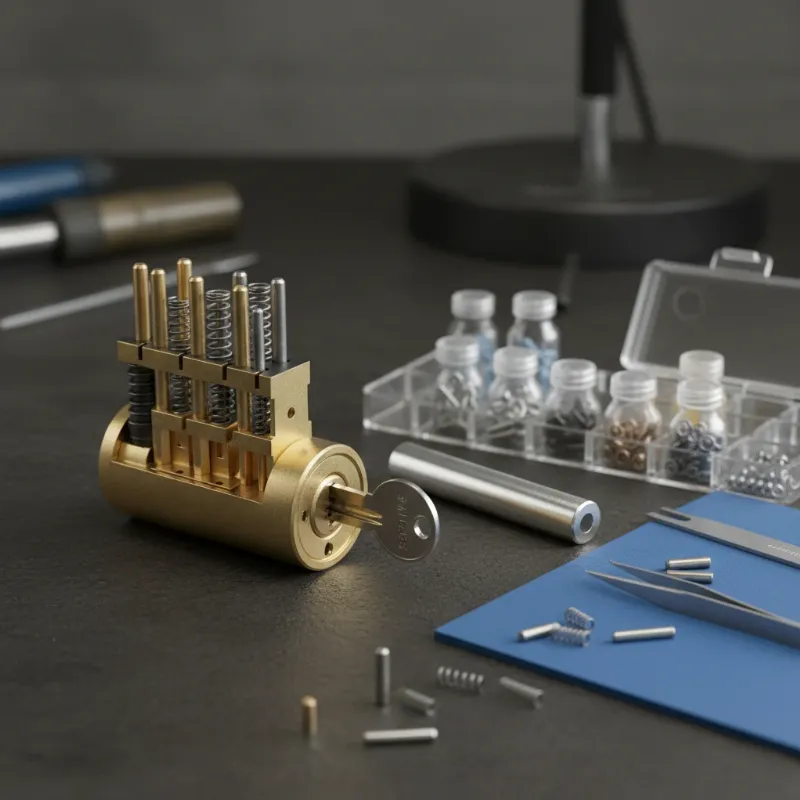 A disassembled Schlage lock cylinder with rekeying tools and pins
Traditional Pin-and-Tumbler Rekeying (for compatible smart locks):
This method involves the delicate process of disassembling the lock cylinder to remove and replace the internal pins to match the bitting of your desired old key.
- Remove the Lock from the Door: Begin by carefully unscrewing and removing the smart lock assembly from your door. This usually involves removing screws from the interior side of the lock.
- Access the Cylinder: For deadbolts, the cylinder is typically held by a retaining screw. For knobs or levers, you might need to find a small hole to depress a clip, allowing you to remove the handle and expose the cylinder.
- Disassemble the Cylinder: Once the cylinder is accessible, you’ll need to remove a C-clip or nut that holds the cylinder plug to its housing.
- Use a Follower Tool: This is a crucial step. To prevent the tiny top pins and springs from flying out, you must insert a follower tool firmly against the rear of the cylinder plug as you extract the plug from its housing. The follower tool maintains pressure on the top pins and springs.
- Remove Old Pins: Once the plug is removed, carefully dump out the existing bottom pins. Insert your old key (the one you want to match) into the cylinder plug.
- Insert New Pins: Using a rekey kit map or by comparing pin sizes to your key’s cuts, insert the correct-sized bottom pins into the cylinder plug so that they form a smooth, flush line with the top of the cylinder when your key is fully inserted.
- Reassemble the Lock: Carefully slide the cylinder plug back into the housing, pushing out the follower tool as you do so. The new pins will now be aligned with your old key.
- Secure and Test: Replace the C-clip or nut to secure the cylinder. Test the lock with your old key multiple times before reinstalling it on the door. Ensure smooth operation.
Given the intricate nature of pin-and-tumbler rekeying, particularly the risk of losing small components, many homeowners opt to call a professional locksmith for this service.
When to Seek Professional Locksmith Assistance
While DIY rekeying is feasible for certain smart locks like those with Kwikset SmartKey technology, there are several scenarios where enlisting the expertise of a professional locksmith is highly recommended. For instance, if you encounter difficulties with the intricate pin-and-tumbler method for some Schlage or other traditional cylinder smart locks, a locksmith can prevent damage and ensure correct functionality. Complex lock systems, such as those with master keying requirements or commercial-grade smart locks, often demand the precision and specialized tools that only a locksmith possesses.
Furthermore, if you’ve lost the original working key for a system that requires it for rekeying (like Kwikset SmartKey), a professional can often bypass this limitation. Locksmiths also offer a cost-effective solution for multiple locks, as they can rekey several units to a single key more efficiently. It’s often more economical to take your locks to their shop rather than paying for a service call to your home.
Choosing a Smart Lock for Easy Rekeying
When selecting a new smart lock with the intention of rekeying it to your existing keys, consider features that prioritize ease and compatibility. Smart locks equipped with Kwikset SmartKey Security® technology are generally the most straightforward for DIY rekeying, as they require no disassembly and a simple three-step process. Brands offering Schlage Advanced Rekey also provide a convenient, homeowner-friendly method for changing keys.
Beyond these specific rekeying mechanisms, ensure the smart lock’s physical keyway is compatible with your current keys. Prioritize smart locks from the same manufacturer as your existing keyed locks to maximize the chance of keyway consistency. Always read product specifications and user reviews to confirm rekeying capabilities and ease before making a purchase. Choosing a lock with these features can save you time and potential locksmith fees in the future.
Maintaining Your Rekeyed Smart Lock
Once you’ve successfully rekeyed your smart lock to match your old keys, proper maintenance is essential to ensure its longevity and continued security. Regularly test the mechanical key functionality to confirm smooth operation and that your new key still works as expected. Keep the keyway clean from dust and debris, as accumulation can hinder the pins and affect key insertion or rotation. A quick spray of a non-oil-based lubricant (like graphite powder, specifically designed for locks) can help maintain the cylinder’s smooth function.
Remember that mechanical rekeying is separate from the electronic functions of your smart lock. Continue to manage and update your digital credentials, such as access codes, e-keys, and app settings, independently. Regularly update the smart lock’s firmware through its companion app to patch security vulnerabilities and gain new features. This dual approach ensures both the mechanical integrity and digital security of your rekeyed smart lock.
Troubleshooting Common Rekeying Issues
Even with careful execution, rekeying can sometimes encounter challenges. One common issue is the key not working after rekeying, which often indicates a misprogramming or incorrect pin setting. For Kwikset SmartKey locks, if neither the old nor new key works, it’s possible the cylinder was misprogrammed. Kwikset provides specific recovery instructions for such scenarios, typically involving a precise sequence with the SmartKey tool and a working key to reset and reprogram the cylinder.
If the SmartKey tool does not engage, ensure it is fully and firmly inserted into the rekeying hole. For traditional pin-and-tumbler locks, a common problem is the lock cylinder jamming or pins and springs scattering during disassembly. This usually means the follower tool was not used correctly or maintained firm pressure, leading to misalignment. If you encounter significant resistance, jamming, or if you suspect internal components are out of place, it is best to stop and contact a professional locksmith. Attempting to force the mechanism can cause irreversible damage to the smart lock.
The Future of Smart Lock Access and Rekeying
The landscape of smart lock technology is continuously evolving, with future developments poised to further streamline access management. We can anticipate even more intuitive digital-first solutions that might reduce the reliance on physical keys, offering virtual keys, temporary access codes, and biometric authentication as primary methods. This shift may lead to smart locks that are entirely keyless, making mechanical rekeying obsolete for those models.
However, the need for a physical override or backup key system is likely to persist due to reliability concerns (e.g., battery failure, network issues) and user preference. Therefore, innovation in mechanical rekeying, such as increasingly simplified DIY systems or highly modular cylinders, will probably continue for hybrid smart locks. The integration of smart locks with broader smart home ecosystems will also deepen, allowing for more seamless and automated security protocols where access can be granted or revoked with voice commands or predefined routines. Ultimately, the future points toward a flexible system that combines cutting-edge digital control with robust, user-manageable mechanical backups.
Conclusion
Rekeying your smart lock to match your old keys offers an exceptional blend of modern security technology and traditional convenience, allowing you to maintain a unified key system for your home. While the process is straightforward for SmartKey-enabled locks from brands like Kwikset, requiring only a simple tool and a few steps, other smart locks with traditional pin-and-tumbler cylinders may demand more technical skill or the assistance of a professional locksmith. Understanding your lock’s specific rekeying mechanism and ensuring keyway compatibility are crucial first steps to a successful rekeying.
By carefully following the instructions or seeking expert help when needed, you can enjoy the enhanced security and smart features of your lock without the hassle of managing multiple physical keys. Embrace the convenience of a single key for your entire home, simplifying your daily routine and providing peace of mind. Are you ready to streamline your home’s security with a unified key system for your smart locks?
Frequently Asked Questions
Can I rekey any smart lock to my old key?
No, not all smart locks can be rekeyed to an old key. Rekeying is only possible for smart locks that feature a physical keyway or cylinder. Furthermore, the old key must have a compatible keyway (e.g., Kwikset key for a Kwikset lock, Schlage key for a Schlage lock) for the rekeying process to work.
Is rekeying a smart lock safe for security?
When performed correctly, rekeying a smart lock to a new key (your old key) is a secure process. It changes the internal lock mechanism, making previous keys inoperable. For Kwikset SmartKey, the process is designed to be secure and simple. However, improper rekeying of traditional pin-and-tumbler locks can compromise security or damage the lock.
What tools do I need to rekey a smart lock?
For Kwikset SmartKey smart locks, you typically only need the existing working key, the new (old) key you wish to use, and the small Kwikset SmartKey tool. For Schlage Advanced Rekey locks, a rekey pin is required. For traditional pin-and-tumbler smart locks, a rekeying kit (including a follower bar, key gauge, and assorted pins) is necessary.
How much does it cost to have a locksmith rekey a smart lock?
The cost to have a locksmith rekey a smart lock can vary based on your location, the complexity of the lock, and whether you bring the lock to their shop or require a service call. Typically, rekeying a single lock in a shop might cost between $15-$30, while an onsite service call will be more expensive.
Can I use a Kwikset key in a Schlage smart lock?
No, you cannot use a Kwikset key in a Schlage smart lock, and vice versa. Kwikset and Schlage use distinct keyways, meaning the physical shape and milling of their keys are different. Attempting to force an incompatible key can damage the lock cylinder.
