Let’s be honest, hosting a party is a delicate balance of chaos and fun. You’re juggling music, food, and conversations, but there’s one job that always pulls you away: doorman. The doorbell rings, you rush to open it, and you miss a great story or the punchline of a joke. What if you could eliminate that interruption for good? That’s where a Smart Lock With Guest Codes For Parties becomes your new best friend, transforming your entryway from a constant chore into a seamless, secure welcome mat for your friends and family. It’s not just a gadget; it’s your ticket to being a more present and relaxed host.
The Problem with Old-School Party Access
Picture this: you’re hosting a big get-together. How do guests get in? You could leave the door unlocked, but that’s a huge security risk, practically an open invitation for anyone to wander in. Or you could hide a key under the mat, the oldest and least secure trick in the book. The only other option is the one we all know too well—running to the door every five minutes. It fragments your attention and keeps you from actually enjoying the event you worked so hard to plan.
Traditional keys are a one-size-fits-all solution in a world that needs flexibility. Giving someone a key means giving them permanent, untraceable access until you get it back. For a party, that’s just not practical or safe.
So, How Does a Smart Lock with Guest Codes for Parties Work?
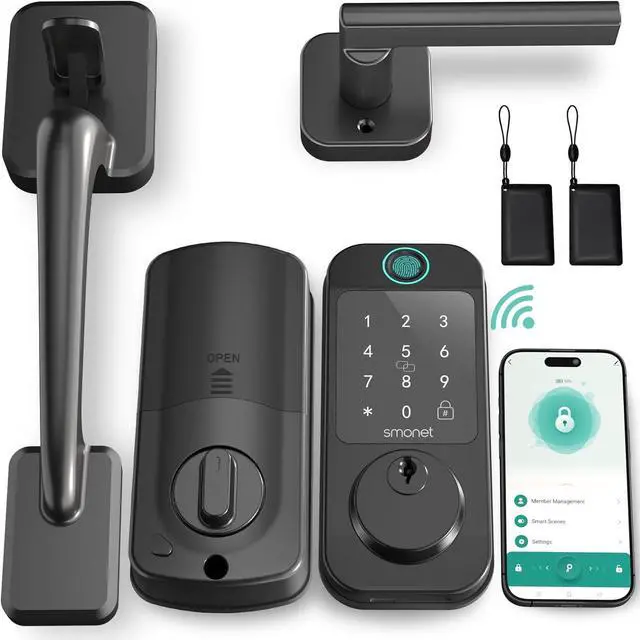
A smart lock isn’t just a deadbolt with a keypad. Think of it as a sophisticated access manager for your home. It replaces your traditional lock and allows you to lock and unlock your door using your phone, a fingerprint, or, most importantly for our topic, unique numerical codes.
A smart lock with guest codes for parties is specifically designed to handle temporary access. Instead of giving everyone your personal master code, you can create special, limited-use codes just for the event. The real magic is in the control it gives you. You can set a code to be active only for the duration of the party—say, from 7 PM to midnight on a Saturday. Once the clock strikes twelve, that code automatically expires. No awkward conversations about getting a key back, no worries about who might still have access. It’s clean, simple, and secure.
The Technology Behind the Convenience
It all sounds great, but what’s happening behind the scenes? Most smart locks operate using a few key technologies:
- Bluetooth: This lets you control your lock when you’re nearby, typically within about 30 feet. It’s perfect for unlocking the door with your phone as you walk up to it. It’s low-energy, so it’s great for battery life.
- Wi-Fi: This is the game-changer for remote access. A Wi-Fi-enabled smart lock connects to your home’s internet router. This allows you to create or delete guest codes, lock or unlock the door, and check its status from anywhere in the world with an internet connection. Stuck in traffic and your first guest has arrived? No problem, just let them in from your phone.
- Z-Wave and Zigbee: These are other low-power wireless protocols often used in smart home devices. They create a “mesh network” where devices can talk to each other. They typically require a separate smart home hub (like Samsung SmartThings or Hubitat) to connect to the internet.
For the ultimate party-hosting convenience, a lock with a built-in Wi-Fi bridge is often the best choice, as it gives you that crucial remote-control capability without needing extra hardware.
Your Guide to Choosing the Perfect Party-Ready Smart Lock
Okay, you’re sold on the idea. But with so many options out there, how do you pick the right smart lock with guest codes for parties? It’s easier than you think. Let’s walk through the key considerations.
- Check Your Door’s Compatibility: This is step one. Before you fall in love with a lock, make sure it will actually fit your door. Most smart locks are designed for standard American doors. Check the thickness of your door and the “backset” (the distance from the edge of the door to the center of the hole for the lock). The product specifications will always list the requirements.
- Decide on Your Connectivity Needs: Do you need to manage access when you’re away from home? If yes, you need a Wi-Fi-enabled lock. If you’re happy just creating codes while you’re at home via Bluetooth, you can save a bit of money and get a Bluetooth-only model. My personal recommendation? Go for Wi-Fi. The peace of mind of being able to check if the door is locked after everyone has left is worth every penny.
- Consider Power and Battery Life: Most smart locks run on standard AA batteries. They typically last anywhere from 6 to 12 months, depending on usage. Look for models that have a low-battery indicator in the app, so you’re never caught by surprise. Some even have a backup option, like terminals on the bottom where you can touch a 9V battery to give it a temporary boost to get inside.
- Think About Smart Home Integration: Do you already use Amazon Alexa, Google Assistant, or Apple HomeKit? If so, look for a smart lock that plays nicely with your existing ecosystem. It’s incredibly cool to be able to say, “Hey Google, lock the front door,” as you’re heading to bed after a long night of hosting.
- Don’t Skimp on Security: This is a security device, after all. Look for locks that use at least AES 128-bit encryption, which is a banking-grade security standard. Also, check the physical strength. Look for an ANSI/BHMA Grade 1 or Grade 2 rating, which certifies its durability against physical attacks.
|
Our Picks for the Best Smartlocks in 2026
As an Amazon Associate I earn from qualifying purchases.
|
||
| Num | Product | Action |
|---|---|---|
| 1 | TEEHO TE001 Keyless Entry Door Lock with Keypad - Smart Deadbolt Lock for Front Door with 2 Keys - Auto Lock - Easy Installation - Matte Black |

|
| 2 | ULTRALOQ U-Bolt Pro WiFi Smart Lock with Door Sensor, 8-in-1 Keyless Entry Door Lock with Fingerprint ID, App Remote Control, Built-in WiFi Keypad Deadbolt, Auto Unlock, IP65 Waterproof, Easy Install |
|
| 3 | Keypad & Key Smart Door Lock, 50 User Codes, Waterproof, Auto Lock - Matte Black |
|
| 4 | Yale Security Assure Lock 2 Deadbolt, Black Suede Keyed Smart Entry Door Lock with Wi-Fi Connected Keypad for Code Entry and Remote Access, YRD410-WF1-BSP |
|
| 5 | Schlage Encode Plus Smart Wi-Fi Lock for Front Door, Keyless Entry Deadbolt, Unlock with Apple Watch, Built-in WiFi and App Control, Easy Install, Alexa & Apple HomeKit Compatible, Matte Black |
|
| 6 | Keyless Entry Fingerprint Smart Lock with Handle & Keypad: Sifely Biometric Digital Electronic Lock with Code, Electric Deadbolt Door Knob for Front, Interior, Exterior & Bedroom Doors (Silver) |
|
| 7 | Kwikset Powerbolt 250 10-Button Keypad Satin Nickel Transitional Electronic Deadbolt Door Lock, Featuring Convenient Keyless Entry, Customizable User Codes, Auto Locking |
|
| 8 | Smart Keypad Door Lock with Handle: NICE DIGI Keyless Entry Digital Lock for Front/Interior Door, Electronic Code Knob, Easy Installation |
|
| 9 | Keypad Smart Door Lock with Knob, Yamiry Keyless Entry Digital Lock with Handle, Fingerprint Electronic Knob for Front Door, Generate Passcode Remotely, Easy Installation |
|
| 10 | Schlage Encode Smart WiFi Deadbolt Lock for Front Door - Keyless Entry with App or Touchscreen - Works with Alexa, Hey Google, & Airbnb - Create Codes for Guests - Satin Nickel Silver |
|
“A common mistake is focusing solely on the ‘smart’ features and forgetting the ‘lock’ part,” warns David Chen, a leading home security analyst. “A great app is useless if the deadbolt itself is flimsy. Always look for a balance between robust digital encryption and strong, certified physical construction.”
Beyond the Party: Unexpected Perks of Guest Access
While a smart lock with guest codes for parties is a fantastic tool for entertaining, you’ll quickly find it becomes indispensable for everyday life. The same feature that lets your party guests in can also provide secure, keyless access for:
- Service Providers: Let the dog walker, house cleaner, or contractor in with their own unique code that only works during their scheduled time.
- Deliveries: Worried about package theft? Some locks can be integrated with delivery services, allowing a courier to securely place a package inside your door or garage.
- Family and Friends: Give your in-laws a permanent code so they don’t need a key. Or create a temporary one for a friend who is house-sitting while you’re on vacation.
- Rental Properties: For Airbnb or VRBO hosts, the ability to remotely create and delete codes for each new guest is an absolute game-changer. It streamlines check-in and enhances security immensely.
Frequently Asked Questions (FAQ)
Here are some of the most common questions people have when considering a smart lock.
What happens if the power or my Wi-Fi goes out?
This is a top concern, but it’s a non-issue. The lock itself is battery-powered, so a power outage won’t affect it. The keypad and internal mechanism will still work perfectly. If your Wi-Fi is down, you won’t be able to control it remotely, but existing codes and your physical key will still function as a backup.
Are these smart locks difficult to install?
Not at all! If you can use a screwdriver, you can likely install a smart lock. Most models are designed to fit into the existing holes of your old deadbolt. The whole process usually takes less than 30 minutes, and the companion apps provide excellent step-by-step video instructions.
How many guest codes can I create?
This varies by brand, but most modern smart locks allow you to create dozens, if not hundreds, of unique codes. You’ll have more than enough for a party, plus individual codes for every family member and service provider.
How secure are the temporary guest codes?
They are extremely secure. The codes are transmitted with strong encryption, and the ability to limit them by time or a specific number of uses makes them far more secure than a physical key that can be lost, stolen, or copied. Plus, the access log tells you exactly when each code was used.
Can I still use a regular key?
Absolutely. Nearly every smart deadbolt on the market comes with a traditional keyway as a backup. It’s there for ultimate peace of mind, ensuring you can always get in, no matter what.
Your Upgrade to Effortless Hosting and Everyday Security
Making the switch to a smart lock with guest codes for parties is one of the most practical and impactful upgrades you can make to your home. It solves a real, tangible problem for anyone who loves to entertain, removing a layer of stress and allowing you to be a more engaged host. But its benefits extend far beyond that, offering a new level of convenience and security for your daily life. You’re not just buying a new lock; you’re investing in peace of mind and reclaiming your time. So go ahead, plan that next party, and get ready to enjoy it from the inside, not from the doorway.